How to Erase Permanent Dtc
OUTLINE
When a DTC is stored in ECM
When a DTC is stored in ECM and MIL is ON, a permanent DTC is erased with MIL shutoff if the same malfunction is not detected after performing the driving pattern for MIL shutoff three times in a raw.
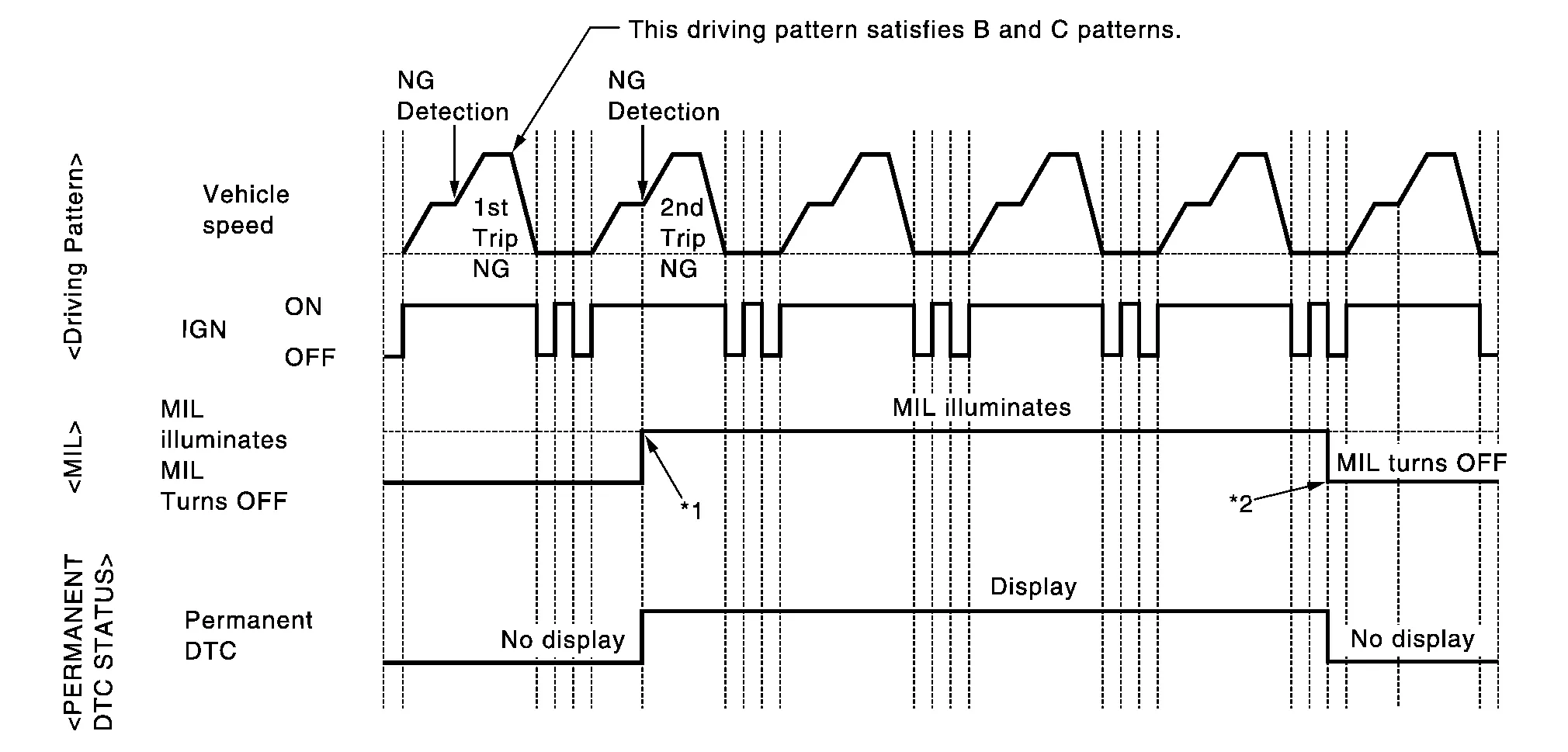
| *1: | When the same malfunction is detected in two consecutive trips, MIL will illuminate. | *2: | MIL will turn off after Nissan Murano vehicle is driven 3 times (driving pattern B) without any malfunctions. |
When a DTC is not stored in ECM
The erasing method depends on a permanent DTC stored in ECM. Refer to the following table.
×: Applicable —: Not applicable
| Group* | Perform “DTC CONFIRMATION PROCEDURE” for applicable DTCs. | Driving pattern | Reference | |
|---|---|---|---|---|
| B | D | |||
| A | × | — | — | Work Procedure (Group A) |
| B | — | × | × | Work Procedure (Group B) |
*: For group, refer to DTC Index.
PERMANENT DTC ITEM
For permanent DTC items, MIL turns ON. Refer to DTC Index.
PERMANENT DTC SERVICE PROCEDURE

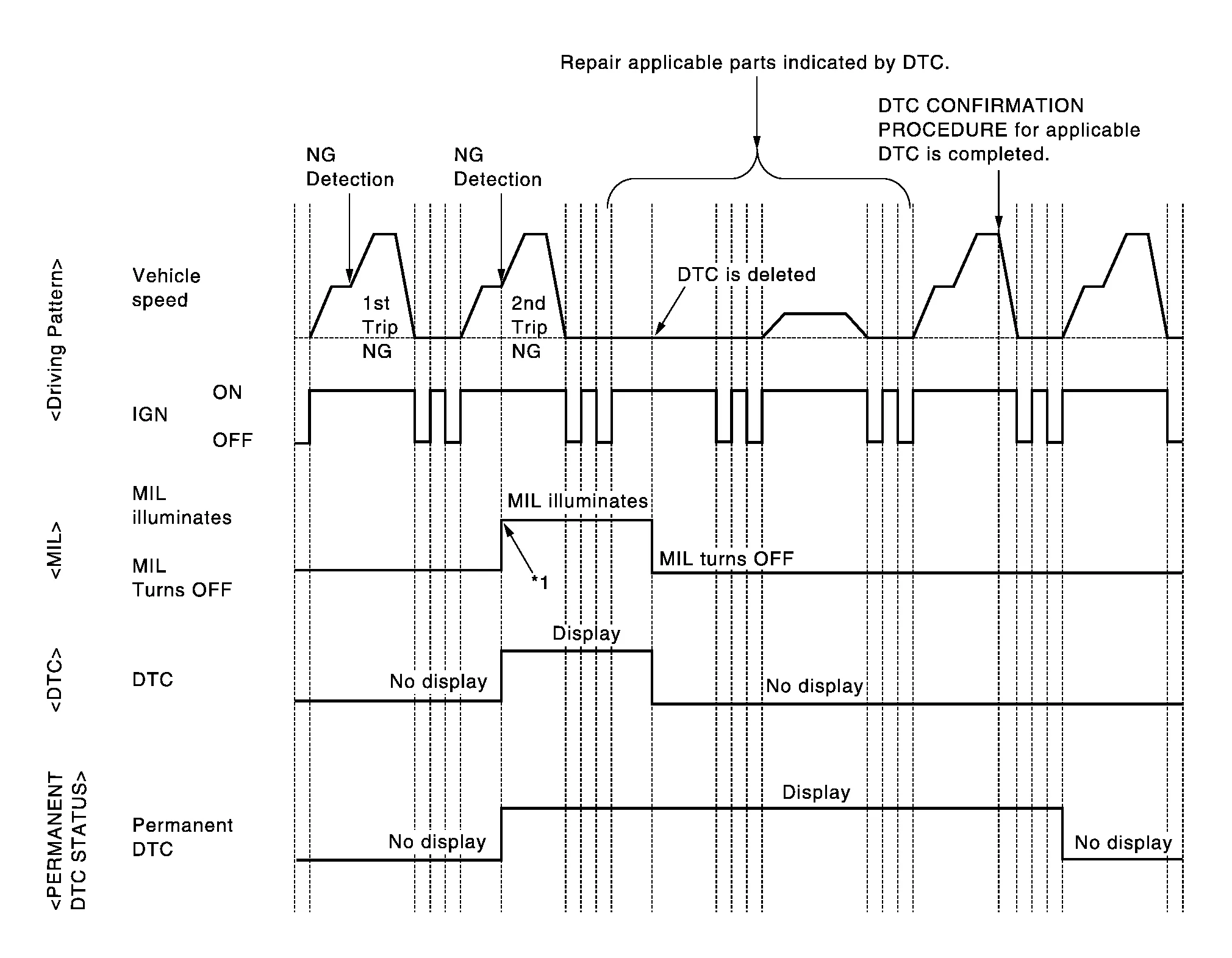
| *1: | When the same malfunction is detected in two consecutive trips, MIL will illuminate. |
CHECK DTC
Check DTC.
Is any DTC detected?
YES>>Repair malfunction(s) and erase DTC. Refer to CONSULT Function.
NO>>GO TO 2.
CHECK PERMANENT DTC
 With CONSULT
Turn ignition switch OFF and wait at least 10 seconds.
Turn ignition switch ON.
Turn ignition switch OFF and wait at least 10 seconds.
Turn ignition switch ON.
Select “PERMANENT DTC STATUS” mode with CONSULT.
 With GST
Turn ignition switch OFF and wait at least 10 seconds.
Turn ignition switch ON.
Turn ignition switch OFF and wait at least 10 seconds.
Turn ignition switch ON.
Select Service $0A with GST.
Is any permanent DTC detected?
YES>>GO TO 3.
NO>>END
PERFORM DTC CONFIRMATION PROCEDURE
Perform “DTC CONFIRMATION PROCEDURE” for DTCs which are the same as permanent DTCs stored in ECM. Refer to DTC Index.
>>GO TO 4.
CHECK PERMANENT DTC
With CONSULT
Turn ignition switch OFF and wait at least 10 seconds.
Turn ignition switch ON.
Turn ignition switch OFF and wait at least 10 seconds.
Turn ignition switch ON.
Select “PERMANENT DTC STATUS” mode with CONSULT.
With GST
Turn ignition switch OFF and wait at least 10 seconds.
Turn ignition switch ON.
Turn ignition switch OFF and wait at least 10 seconds.
Turn ignition switch ON.
Select Service $0A with GST.
Is any permanent DTC detected?
YES>>GO TO 1.
NO>>END
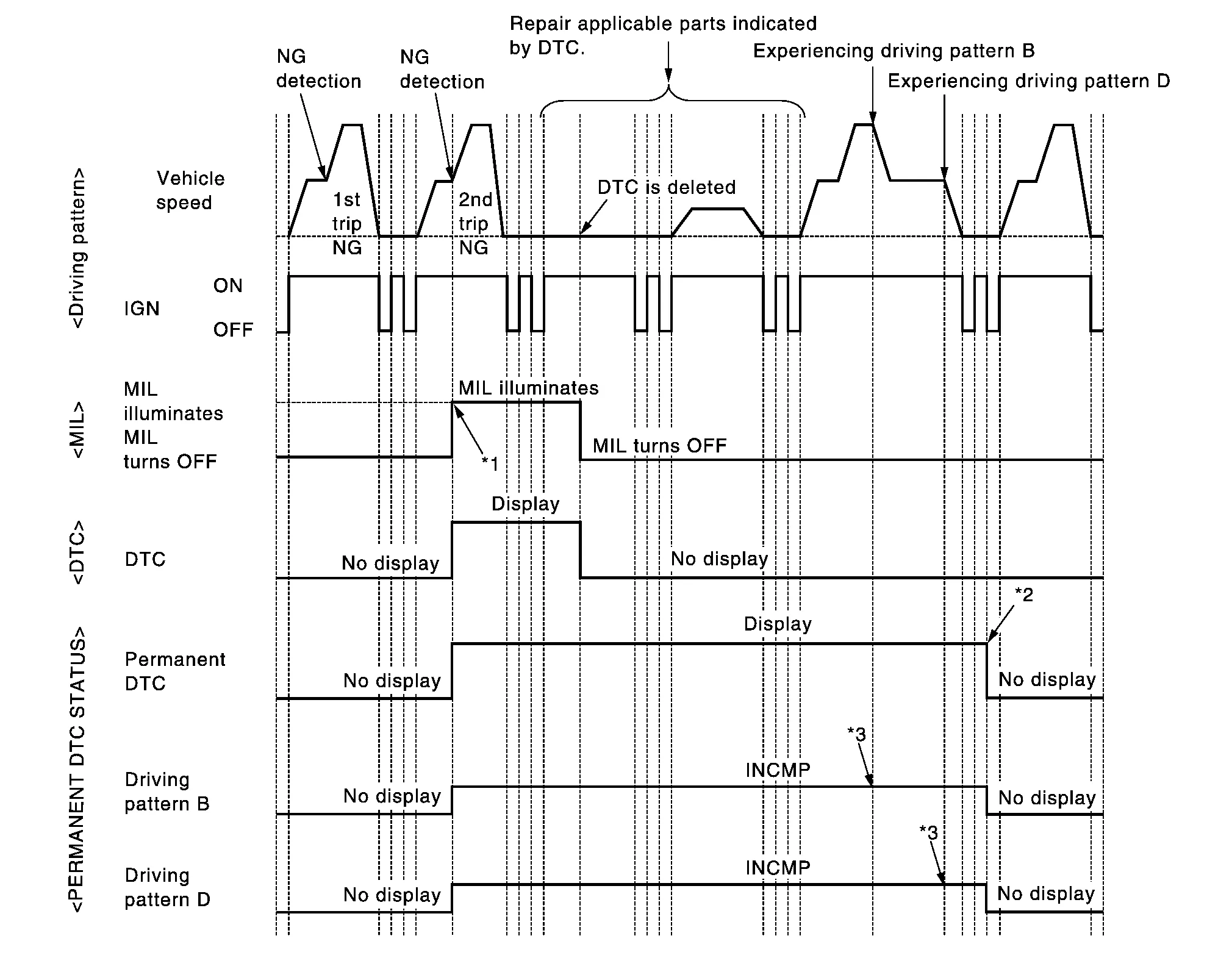
| *1: | When the same malfunction is detected in two consecutive trips, MIL will illuminate. | *2: | After experiencing driving pattern B and D, permanent DTC is erased. | *3: | Indication does not change unless the ignition switch is turned from ON to OFF twice even after experiencing driving pattern B or D. |
CHECK DTC
Check DTC.
Is any DTC detected?
YES>>Repair malfunction(s) and erase DTC. Refer to CONSULT Function.
NO>>GO TO 2.
CHECK PERMANENT DTC
With CONSULT
Turn ignition switch OFF and wait at least 10 seconds.
Turn ignition switch ON.
Turn ignition switch OFF and wait at least 10 seconds.
Turn ignition switch ON.
Select “PERMANENT DTC STATUS” mode with CONSULT.
With GST
Turn ignition switch OFF and wait at least 10 seconds.
Turn ignition switch ON.
Turn ignition switch OFF and wait at least 10 seconds.
Turn ignition switch ON.
Select Service $0A with GST.
Is any permanent DTC detected?
YES>>GO TO 3.
NO>>END
DRIVE DRIVING PATTERN B
With CONSULT
Start engine and warm it up to normal operating temperature.
Use “PERMANENT DTC WORK SUPPORT” mode with CONSULT to drive the Nissan Murano vehicle according to driving pattern B. Refer to CONSULT Function, Driving Pattern.
With GST
Start engine and warm it up to normal operating temperature.
Drive the Nissan Murano vehicle according to driving pattern B. Refer to Driving Pattern.
GO TO 4.
CHECK PERMANENT DTC
With CONSULT
Turn ignition switch OFF and wait at least 10 seconds.
Turn ignition switch ON.
Turn ignition switch OFF and wait at least 10 seconds.
Turn ignition switch ON.
Select “PERMANENT DTC STATUS” mode with CONSULT.
With GST
Turn ignition switch OFF and wait at least 10 seconds.
Turn ignition switch ON.
Turn ignition switch OFF and wait at least 10 seconds.
Turn ignition switch ON.
Select Service $0A with GST.
Is any permanent DTC detected?
YES>>GO TO 5.
NO>>END
DRIVE DRIVING PATTERN D
Drive the Nissan Murano vehicle according to driving pattern D. Refer to Driving Pattern.
GO TO 6.
CHECK PERMANENT DTC
With CONSULT
Turn ignition switch OFF and wait at least 10 seconds.
Turn ignition switch ON.
Turn ignition switch OFF and wait at least 10 seconds.
Turn ignition switch ON.
Select “PERMANENT DTC STATUS” mode with CONSULT.
With GST
Turn ignition switch OFF and wait at least 10 seconds.
Turn ignition switch ON.
Turn ignition switch OFF and wait at least 10 seconds.
Turn ignition switch ON.
Select Service $0A with GST.
Is any permanent DTC detected?
YES>>GO TO 1.
NO>>END