Driver information center
The Driver Information Centre (DIC) is located in the instrument cluster between the speedometer and the tachometer. It is available as a mid-level display or as a top-level display or top-level combi display.
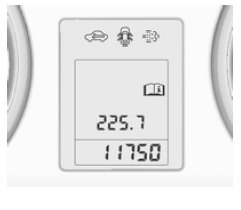
The mid-level display shows:
- total odometer
- trip odometer
- certain indicator lights
- vehicle information
- trip/fuel information
- vehicle messages, displayed as 109 numeric codes.

On the top-level display, the following main menus can be selected by pressing the MENU button:
- Vehicle information menu
- Trip/fuel information menu
- Performance menu

On the top-level combi display, the following main menus can be selected by pressing the MENU button. The menu symbols are shown on the top line of the display:
 Vehicle
information menu Trip/
fuel info menu ECO information menu
 Performance menu
Some of the displayed functions may differ depending on whether the vehicle is moving (being driven) or stationary. Some functions are only available while the vehicle is being driven.
Vehicle personalisation 116.
Stored settings 23.
Selecting menus and functions
Menus and functions can be selected using the buttons on the turn signal lever.
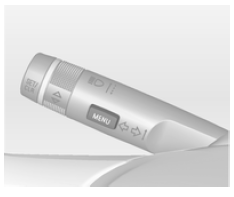
Press the MENU button to move from one menu to another, or to return to the next higher menu level from a submenu.
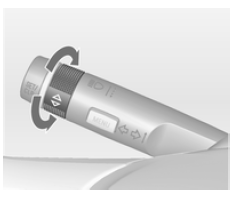
Turn the thumbwheel to highlight a menu option or to adjust a numerical value.
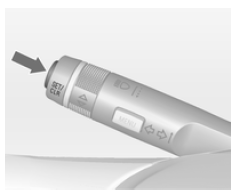
Press the SET/CLR button to select a function or confirm a message.
Vehicle information menu
Press the MENU button to select the Vehicle information menu, or select it on the top-level combi display, .
Turn the thumbwheel to select a submenu. Press the SET/CLR button to confirm.
Follow the instructions provided in the submenus.
The available submenus depend on the version:
- Units: the display units can be changed.
- Language: the display language can be changed if the vehicle is not equipped with a radio.
- Tyre pressure: checks the tyre pressure of all wheels while the vehicle is driving 232.
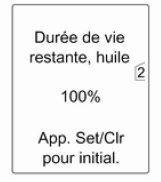 Remaining
oil life: shows the oil change and oil filter replacement interval 90.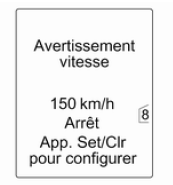 Speed
warning: if a preset speed is exceeded, an audible signal will sound.- Road sign assistant: displays the road signs for the current route section 186.
- Forward distance indication: displays the distance to a vehicle ahead 179.
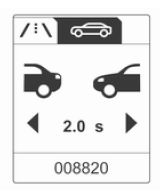 The selection and
display may differ depending on the display type (mid-level, top-level and top-level combi).
Trip/fuel information menu
Press the MENU button to select the Trip/fuel info menu, or select on the top-level combi display. Turn the thumbwheel to select a submenu. Press the SET/CLR button to confirm.
 Trip
odometer 1- Trip odometer 2
- Digital speed
Trip odometer 2 and digital speed are only available on vehicles with a top-level or top-level combi display.
Reset the trip odometer by pressing and holding the SET/CLR button on the turn signal lever for a few seconds, or by pressing the reset button between the speedometer and the driver information centre with the ignition on.
Several submenus are available on vehicles equipped with a trip computer.
The selection and display may differ depending on the display type (mid-level, top-level and top-level combi).
Trip and fuel information menu, trip computer 113.
ECO information menu
Press the MENU button to select the ECO symbol on the top line of the top-level combi display.
Turn the thumbwheel to select a submenu. Press the SET/CLR button to confirm.
The submenus are:
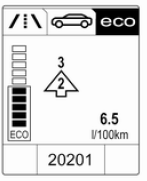 Gear shift indicator: the current gear is shown inside an arrow. The symbol above it recommends when to shift up to save fuel.
Eco index display: the current fuel consumption is shown by a segmented bar display.
Adapt your driving style to drive economically so that the segments stay filled within the Eco zone. The more segments are filled, the higher the fuel consumption. The current consumption value is also displayed.
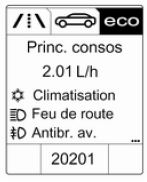 Main consumers: the list of the main comfort consumers currently switched on is displayed in descending order. The potential fuel saving is shown.
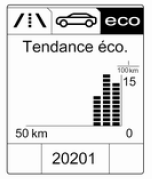 Eco trend: shows the progression of average consumption over a distance of 50 km. The filled segments show consumption in 5 km steps, and show the effect of topography or driving behaviour on fuel consumption.
Performance menu
 Press the
MENU button to select the Performance menu, or select on the top-level combi display.
Turn the thumbwheel to select a submenu. Press the SET/CLR button to confirm.
The submenus are:
- Oil temp: displays the oil temperature.
- Oil press: displays the oil pressure.
- Boost press: displays the boost pressure.
- Lap timer: displays split times, maximum speed, average speed and average time. Follow the instructions provided in the submenu.
- Coolant temp: displays the coolant temperature.
- Battery voltage: displays the battery voltage.
Test yourself
A quick Opel Insignia quiz: every answer comes with an explanation and a link to the manual page.