Menu "SETUP"
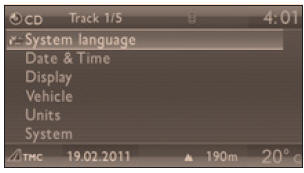
- Press the "SETUP" button to open the "SETUP" menu. The following functions can be selected in the menu:
- "Languages",
- "Date and time",
- "Display settings",
- "Vehicle settings",
- "Units",
- "System settings".
Languages
This menu allows you to select the language of the displayed information: German, English, Spanish, French, Dutch, Polish, Portuguese, Turkish *.
Date and time
This menu allows you to set the date and time, the date format and the time format (see the "Audio and telematics" section or the separate instructions supplied with the on-board documentation).
Display settings
This menu allows you to set the screen brightness, the screen colour calibration and the map colour (day/night mode or automatic).
Vehicle settings
This menu allows you to enable or disable certain driving and comfort functions:
- windscreen wiper linked to reverse gear (see the "Visibility" section),
- welcome lighting and its duration (see the "Visibility" section).
Units
This menu allows you to select the units: temperature (°C or °F) and fuel consumption (km/l, l/100 km or mpg).
System settings
This menu allows you to restore the factory settings, display the software version and enable text scrolling.
For safety reasons, always configure the multifunction displays only when the vehicle is stopped.Test yourself
A quick Peugeot 207 quiz: every answer comes with an explanation and a link to the manual page.