Driving checks
Switches
In this manual: Driving checks
~1min read
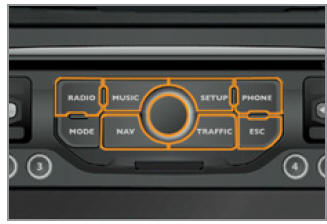
To select a specific application on the WIP Nav panel, proceed as follows:
- Press the appropriate button "RADIO", "MUSIC", "NAV", "TRAFFIC", "SETUP" or "PHONE" to open the corresponding menu,
- turn the knob to scroll through the selection,
- press the knob to confirm the selection, or
- press the "ESC" button to cancel the current operation and return to the previous display.
Test yourself
A quick Peugeot 207 quiz: every answer comes with an explanation and a link to the manual page.
Was this page helpful?