Driving
Programming
In this manual: Driving
~1min read
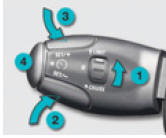
- Set dial 1 to "LIMIT": this selects the limiter mode, unless it is already on (OFF).
It is not necessary to switch on the speed limiter in order to set the speed.
- Adjust the value using buttons 2 or 3 (e.g. 110 km/h).
The programmed speed can be changed using buttons 2 and 3:
- + or - 1 km/h = short press,
- + or - 5 km/h = long press,
- + or - 5 km/h in steps = press and hold.
- Switch on the limiter by pressing button 4.
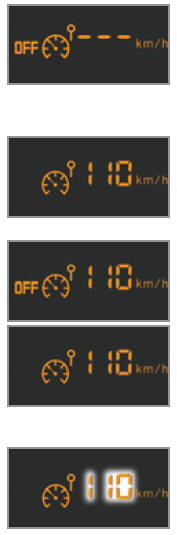
- Switch off the limiter by pressing button 4: the display confirms that it is off (OFF).
- To switch the limiter back on, press button 4.
Exceeding the set speed
Pressing the accelerator pedal to exceed the programmed speed will not cause acceleration unless it is pressed fully down, past the detent point.
At this point the limiter is switched off and the speed value flashes on the display.
When returning to the programmed speed, whether by forced deceleration or not, the value stops flashing.
Returning to normal driving
Set dial 1 to "0": the limiter mode is off. The display returns to showing the odometer.
Test yourself
A quick Peugeot 207 quiz: every answer comes with an explanation and a link to the manual page.
Was this page helpful?