Fault location tree
| ALP 1 | Locking / unlocking problem using the button on the key card |
INSTRUCTIONS
Check that accessory mode is off and that no key card is in the card reader.
First carry out a diagnostic of the function.
Test with the other key card.
Check the condition of the batteries.
| Check that states ET066 "Key card button press received" and ET067 "Key card button press recognised" are YES after pressing the locking or unlocking button on the key card. If not compliant, apply the diagnostic associated with these states. |
| Activate commands AC004 "Lock doors" and AC005 "Unlock doors" to check the operation of the locks and that the Cabin Central Unit can control them. If not compliant, apply the diagnostic associated with these commands. |
| If the problem persists, contact Techline. |
| ALP 2 | Locking / unlocking problem of the boot using the button on the key card |
INSTRUCTIONS
Check that accessory mode is off and that no key card is in the card reader.
First carry out a diagnostic of the function.
Test with the other key card.
Check the condition of the batteries.
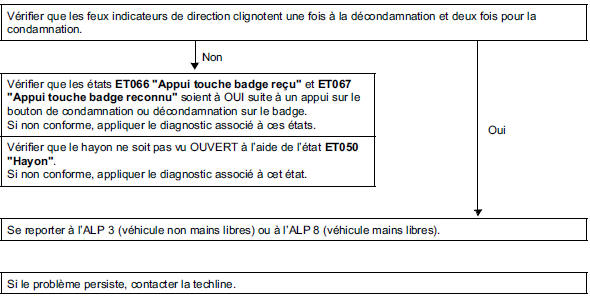
| ALP 3 | Tailgate opening problem (non hands-free) |
INSTRUCTIONS
First carry out a diagnostic of the function.
The vehicle or the boot must be unlocked.
| Check that state ET061 "Tailgate opening request" changes to PRESENT after pressing the tailgate opening button. If not compliant, apply the diagnostic associated with this state. |
| Check that the tailgate is not seen as OPEN using state ET050 "Tailgate". If not compliant, apply the diagnostic associated with this state. |
| If the problem persists, contact Techline. |
| ALP 4 | Rear window opening problem. |
INSTRUCTIONS
First carry out a diagnostic of the function.
The vehicle or the boot must be unlocked.
| Check that state ET062 "Rear window opening request" changes to PRESENT after pressing the rear window opening button. If not compliant, apply the diagnostic associated with this state. |
| Check that the rear window is not seen as OPEN using state ET041 "Rear window open". If not compliant, apply the diagnostic associated with this state. |
| If the problem persists, contact Techline. |
| ALP 5 | Fuel filler flap locking / unlocking problem |
INSTRUCTIONS
First carry out a diagnostic of the function.
Locking / unlocking must work from the driver's door.
| With the flap open, lock and unlock the vehicle and check that the locking pin slides correctly. If correct, make sure the flap is correctly positioned in relation to the movement of the locking pin. |
| Check the condition and connection of the fuel filler flap lock connector. Repair if necessary. |
| Check for ground on both pins of the fuel filler flap lock connector. Check during locking: ground on pin 3 and +12 V on pin 1 of the fuel filler flap lock connector. During unlocking: ground on pin 1 and +12 V on pin 3 of the fuel filler flap lock connector. If compliant, replace the fuel filler flap lock. |
| Check insulation and continuity of the wiring: Cabin Central Unit connector PP2 pin 6 → Pin 1 of fuel filler flap lock connector Repair if necessary. |
| If the problem persists, contact Techline. |
| ALP 6 | Unlocking problem in hands-free operation |
INSTRUCTIONS
Check that accessory mode is off and that no key card is in the card reader.
Tests must be carried out with all other key cards assigned to the vehicle.
First carry out a diagnostic of the function.
Carry out a compliance check before using this method.
Check that none of the key cards has been inhibited (locked inside the vehicle). Switch to accessory mode with that key card and try unlocking again with that key card.
| Check that the optical sensors are powered, using state ET054 "Optical sensors powered". Unless the vehicle has not been opened for more than 72 hours, wake-up is done by pulling the handle. If not compliant, apply the diagnostic associated with this state. |
| Check that states ET055, ET056 or ET057 become active as soon as the hand is in front of the corresponding sensor. Try on all doors. If one of the states does not change, apply the diagnostic associated with that state. Note: one of these states becomes active if the vehicle has remained unopened for more than 72 hours and the corresponding door handle is pulled! |
| Check that the key cards belong to the vehicle and that the configurations in the key card are compliant, using command SC005 "Key card check". If the key fobs belong to the vehicle but are incorrectly configured, perform a key fob learning procedure. |
| Activate command AC037 "Transmitter antenna diagnosis" and check whether a fault has appeared. If a fault is present or stored, refer to the fault's troubleshooting procedure. |
| Activate the following commands and check the key fob detection range on each side of the vehicle: AC032 "Exterior antenna test, driver side" The key fob reader flashes as soon as a key fob is detected within the coverage area. The maximum distance from the vehicle is 1.5 m. If not compliant, apply the associated diagnostic procedure for each command. WARNING: this mode detects the presence of a Mégane hands-free key fob, but does not recognise it. |
| If the problem persists, contact Techline. |
| ALP 7 | Central locking problem in hands-free operation |
INSTRUCTIONS
Check that accessory mode is off and that no key card is in the card reader.
Tests must be carried out with all other key cards assigned to the vehicle.
First carry out a diagnostic of the function.
Check that all doors are closed (check that the interior lights are off, or switch on the ignition to check on the display that no door is open).
Visually check that the central locking buttons are not stuck in the depressed position.
Check that none of the key cards has been inhibited (locked inside the vehicle). Switch to accessory mode with that key card and try unlocking again with that key card.
| Check that states ET058, ET059 or ET060, relating to pressing the central locking button of each door and of the boot, become active after pressing the button. Try all the central locking buttons. Refer to the troubleshooting section for the affected state(s). |
| Check that the key cards belong to the vehicle and that the configurations in the key card are compliant, using command SC005 "Key card check". If the key fobs belong to the vehicle but are incorrectly configured, perform a key fob learning procedure. |
| Activate command AC037 "Transmitter antenna diagnosis" and check whether a fault has appeared. If a fault is present or stored, refer to the fault's troubleshooting procedure. |
| Activate the following commands and check the key fob detection range on each side of the vehicle: AC032 "Exterior antenna test, driver side" The key fob reader flashes as soon as a key fob is detected within the coverage area. The maximum distance from the vehicle is 1.5 m. If not compliant, apply the associated diagnostic procedure for each command. WARNING: this mode detects the presence of a Mégane hands-free key fob, but does not recognise it. |
| If the problem persists, contact Techline. |
| ALP 8 | Boot opening problem in hands-free operation |
INSTRUCTIONS
First carry out a diagnostic of the function.
Vehicle locked.
Test with the other key card.
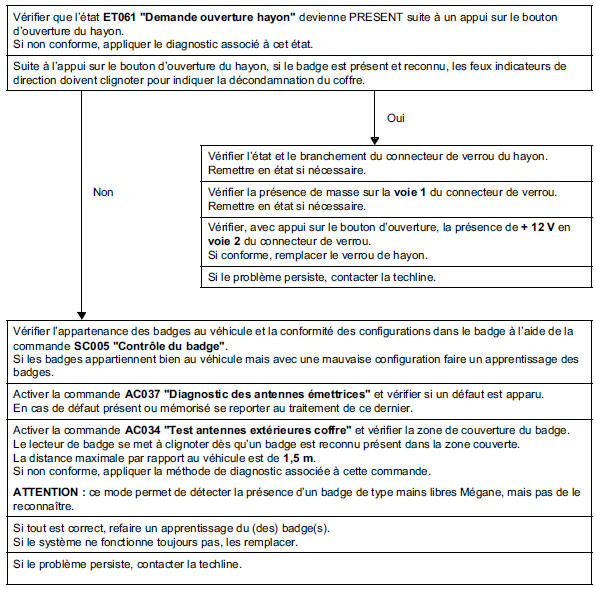
INSTRUCTIONS
First carry out a diagnostic of the function.
Vehicle unlocked.
| Check that state ET061 "Tailgate opening request" changes to PRESENT after pressing the tailgate opening button. If not compliant, apply the diagnostic procedure associated with this state. |
| Check that the tailgate is not seen as OPEN using state ET050 "Rear window opening". If not compliant, apply the diagnostic associated with this state. |
| Check the condition and connection of the tailgate lock connector. Repair if necessary. |
| Check for earth on pin 1 of the lock connector. Repair if necessary. |
| With the opening button pressed, check for +12 V on pin 2 of the lock connector. If compliant, replace the tailgate lock. |
| If the fault persists, contact Techline. |
| ALP 9 | Rear window opening problem in hands-free operation |
INSTRUCTIONS
First carry out a diagnostic of the function.
Vehicle locked.
Test with the other key card.
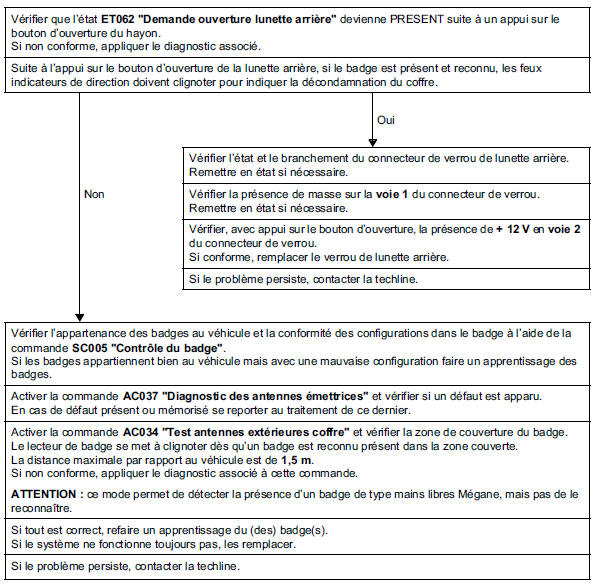
INSTRUCTIONS
First carry out a diagnostic of the function.
Vehicle unlocked.
| Check that state ET062 "Tailgate opening request" becomes PRESENT after pressing the tailgate opening button. If not compliant, apply the diagnostic associated with this state. |
| Check that the tailgate is not seen as OPEN using state ET050 "Rear window opening". If not compliant, apply the diagnostic associated with this state. |
| Check the condition and connection of the rear window lock connector. Repair if necessary. |
| Check for earth on pin 1 of the lock connector. Repair if necessary. |
| With the opening button pressed, check for +12 V on pin 2 of the lock connector. If compliant, replace the rear window lock. |
| If the problem persists, contact Techline. |
| ALP 10 | Locking / unlocking problem on one or more doors |
INSTRUCTIONS
First carry out a diagnostic of the function.
Check whether configuration LC029 "Selective door opening" is set to WITH.
If necessary, reconfigure using command CF036 "Selective door opening".
| Use commands AC004 "Door locking", AC005 "Door unlocking" and AC006 "Driver door unlocking" to confirm the fault. Apply the diagnosis associated with these commands. |
| If the problem persists, contact Techline. |
| ALP 11 | Automatic Locking While Driving (CAR) malfunction |
INSTRUCTIONS
First carry out a diagnostic of the function.
Check that the Automatic Locking While Driving function is active using state ET043 "CAR function authorisation by CPE".
Check that no door is recognised as open by the Passenger Compartment Control Unit.
Check the consistency of the vehicle speed information.
Check that there is no ABS system fault.
Check that there is no Airbag system fault.
If the problem persists, contact Techline.
| ALP 12 | The windows do not close after the two locking requests |
INSTRUCTIONS
Check that the vehicle is fitted with sequential-control window lifters.
Check that state ET087 "Pulse window lift authorisation" is ACTIVE.
Refer to the troubleshooting for this state if necessary.
If the problem persists, contact Techline.
| ALP 13 | No accessory power supply |
INSTRUCTIONS
Check the battery voltage.
Start the diagnosis with the ignition off and the vehicle locked.
When the vehicle is unlocked, the instrument panel should light up briefly.
otherwise, diagnose the multiplexed network and the instrument panel.
The vehicle should enter timed power supply mode (approximately 20 minutes) after the driver's door is opened (ET053 "Driver door"). If nothing happens, try one of the following:
If compliant, carry out the diagnosis of the state corresponding to the faulty component. If not compliant, apply the "No communication with the UCH" ALP in the Passenger Compartment Control Unit chapter. |
| The vehicle enters accessory mode after pressing the start button (timed power supply active). If not compliant, check the operation of the start button using state ET070 "Start switch" and apply the diagnostic procedure for this state if necessary. If the start button operates correctly, apply the diagnostic procedure for state ET075 "+ accessory present". |
| If the problem persists, contact Techline. |
| ALP 14 | Forced ignition-on mode does not work |
INSTRUCTIONS
Check the battery voltage.
Carry out a diagnosis of the function.
Test with the other key card.
The accessory (+ACC) mode must operate.
Otherwise, deal with ALP 13 as a priority.
During the forced ignition-on attempt, it is possible to check whether the verlog warning light:
- Stays on steadily: this means the steering column lock is not recognised.
- Stays on steadily for 3 seconds and flashes at 4 Hz: this means the card has not been recognised.
Reminder of the forced ignition-on procedure: accessory power supply off, card in the reader, outside starting conditions, followed by a long press (approximately 5 seconds) on the start button.
| Check that the "insert card" message is absent from the instrument panel. Check that the states: ET008 "Blank control unit" is NO. ET011 "Blank key fob" is LEARNED. ET012 "Key fob assigned" is YES. Refer to the troubleshooting for these states if necessary. |
| Check that state ET110 "Request UCH to UPC or injection" changes to +APC following a forced ignition-on request. If everything is correct, carry out a diagnosis of the Protection and Switching Unit. |
Check the operation of the steering column lock, in particular:
Refer to the troubleshooting for these states if necessary. |
| If the problem persists, contact Techline. |
| ALP 15 | The vehicle does not start and ignition-on does not establish, key card in the reader |
INSTRUCTIONS
Check the battery voltage.
First carry out a diagnostic of the function.
Test with the other key card.
Switching to accessory power (+ACC) must work.
Otherwise, carry out fault-finding procedure ALP 13 Passenger Compartment Central Unit as a priority.
Check that no message is displayed on the instrument panel.
Check that the starting conditions are met.
During the starting attempt, it is possible to check whether the immobilizer indicator:
- Stays on steadily: this means the steering column lock is not recognised.
- Stays on steadily for 3 seconds and flashes at 4 Hz: this means the card has not been recognised.
It is also possible to check during the starting attempt whether the start button is flashing. If so, the key card has not been detected or recognized.
Check that the "insert card" message is absent from the instrument panel. Check that the states:
Refer to the troubleshooting for these states if necessary. |
| Check that state ET110 "Request UCH to UPC or injection" changes to START following a start request. If everything is correct, carry out a diagnosis of the Protection and Switching Unit. |
Check the operation of the steering column lock, in particular:
|
| If the problem persists, contact Techline. |
| ALP 16 | The vehicle does not start and ignition-on does not establish in hands-free mode, but works with the key card in the reader |
INSTRUCTIONS
First carry out a diagnostic of the function.
Test with the other key card.
The accessory (+ACC) mode must operate.
Otherwise, carry out fault-finding procedure ALP 13 as a priority.
Check that the starting conditions are met.
Check that the tailgate is recognized as closed by the Passenger Compartment Central Unit using state ET050 "Tailgate".
Carry out tests with the other key cards associated with the vehicle.
| Check in the Passenger Compartment Central Unit that the configurations match hands-free operation. Redo the configurations if necessary. |
| Check that the key cards belong to the vehicle and that the configurations in the key card are compliant, using command SC005 "Key card check". If the key cards belong to the vehicle but are incorrectly configured, carry out a key card learning procedure. |
| Run command AC037 "Transmitting antenna diagnosis" and check whether a fault has appeared. If a fault is present or stored, refer to the fault's troubleshooting procedure. |
| Run command AC036 "Interior antenna test" and check the coverage area of the key card. The key fob reader flashes as soon as a key fob is detected within the coverage area. The key card must not be detected by the interior antennas when outside the vehicle. If not compliant, apply the associated diagnosis for each command. WARNING: this mode detects the presence of a Mégane hands-free key fob, but does not recognise it. |
| If the fault persists, contact Techline. |
| ALP 17 | Vehicle does not start and goes to ignition-on |
INSTRUCTIONS
Check the battery voltage.
Carry out a diagnosis of the function.
Check that the starting conditions are met (no gear engaged).
It is possible to check with the immobilizer indicator whether the injection is still protected (steady light).
Carry out a compliance check of the protection and starting section.
| Check that state ET110 "Request UCH to injection or UPC" is START, starting conditions met, following a button press. In case of a fault, refer to the troubleshooting for this condition. |
| If everything is correct, carry out a diagnosis of the starting circuit in the Protection and Switching Unit. |
| If the problem persists, contact Techline. |
| ALP 18 | The starter operates briefly but the vehicle does not start and goes to ignition-on |
INSTRUCTIONS
Carry out a diagnosis of the function.
Carry out a compliance check of the protection and starting section.
It is possible to check with the immobilizer indicator whether the injection is still protected (steady light).
If the problem persists, contact Techline.
| ALP 19 | Engine cannot be stopped |
INSTRUCTIONS
| Check whether the engine stops with two presses of the start button. In this case, make sure the card is not seen as absent by the Passenger Compartment Central Unit, in particular by checking the messages on the instrument panel. |
| Check that button presses are seen by the Passenger Compartment Central Unit using state ET070 "Start switch". If not compliant, refer to the procedure for this state. |
| Check that state ET110 "Request UCH to injection or UPC" is STOP following a button press. In case of a fault, refer to the troubleshooting for this condition. |
| Check the consistency of parameter PR008 "Vehicle speed" with the vehicle stationary. If inconsistent, carry out a diagnosis of the ABS. |
| If the problem persists, contact Techline. |
| ALP 20 | The steering column lock does not lock |
INSTRUCTIONS
Check that there is no fault on the steering column lock.
Check battery voltage. It must be between 9 V and 16 V.
Check the consistency of parameter PR008 "Vehicle speed".
Check that there is no fault in the airbag control unit.
Reminder: in hands-free mode, the column locks as soon as ignition is switched off.
Key card in the reader: the column locks, after ignition is switched off, as soon as the key card leaves the reader.
| Check the consistency of states ET072 "Steering column lock" and ET073 "Steering column lock information". If there is a problem, refer to the procedure for these states in the Passenger Compartment Central Unit section. |
| If the problem persists, contact Techline. |
| ALP 21 | Unintended start |
INSTRUCTIONS
Carry out a diagnosis of the function.
Manual gearbox
| Check that the clutch pedal switch operates correctly. In particular, check the consistency of state ET048 "Clutch pedal position" in the Passenger Compartment Central Unit. If there is a problem, use the diagnostic method for DF003 "Clutch switch circuit". |
| Check that the brake pedal switch operates correctly. In particular, check the consistency of state ET047 "Brake pedal position" in the Passenger Compartment Central Unit. If there is a problem, use the diagnostic method for DF004 "Brake light switch circuit". |
| Check that the gear lever switch operates correctly. In particular, check the consistency of state ET005 "Manual gearbox gear lever position" in the Protection and Switching Unit. If there is a problem, use the diagnostic method for state ET005. |
| If the problem persists, contact Techline. |
Automatic transmission
| Check that the brake pedal switch operates correctly. In particular, check the consistency of state ET047 "Brake pedal position" in the Passenger Compartment Central Unit. If there is a problem, use the diagnostic method for DF004 "Brake light switch circuit". |
| Check that the clutch pedal switch operates correctly. In particular, check the consistency of state ET108 "Automatic gearbox selector position" in the Passenger Compartment Central Unit. If there is a problem, use the diagnostic method for state ET108. |
| If the problem persists, contact Techline. |
Test yourself
A quick Renault Megane quiz: every answer comes with an explanation and a link to the manual page.