Automatic air conditioning
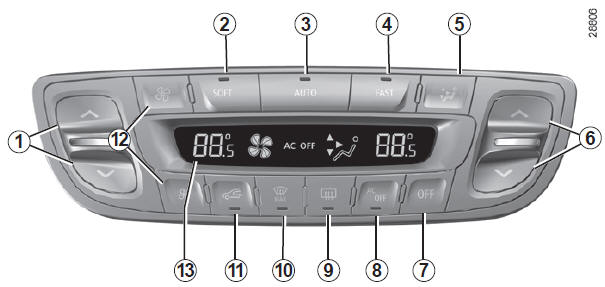
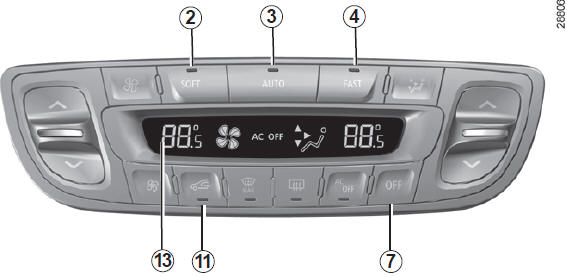
The controls
- and 6 Air temperature.
- , 3 and 4 Automatic programs.
- Air distribution in the cabin.
- System off.
- Air conditioning.
- Defrosting/demisting of the rear window and, depending on vehicle, the mirrors.
- "Clear vision" function.
- Air recirculation.
- Fan speed.
- Display
Automatic mode
Automatic air conditioning ensures (except in extreme conditions) cabin comfort and maintains good visibility while optimising fuel consumption. The system controls fan speed, air distribution, air recirculation, switching the air conditioning on or off, and air temperature. This mode offers three programmes to choose from: AUTO: optimises the achievement of the selected comfort level according to outside conditions. Press button 3.
SOFT: softens the approach to the desired comfort level. The comfort level is then maintained more gently and quietly. Press button 2.
FAST: intensifies the system's action to quickly reach the desired comfort level. Use this program when carrying rear passengers. Press button 4.
Changing the fan speed
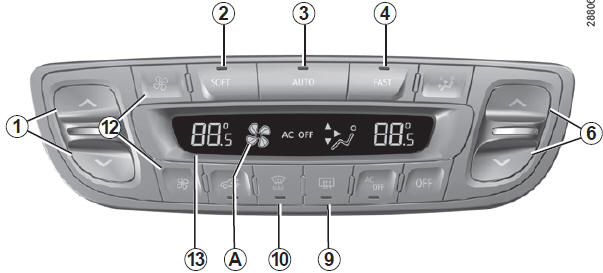
In automatic mode, the system manages the fan speed best suited to reach and maintain comfort.
You can still adjust the fan speed by pressing buttons 12 to increase or decrease it.
In this case, the fan speed, which is no longer managed automatically, appears in zone A of display 13.
Adjusting the temperature
Use button 1 or 6 to increase or decrease the temperature on the left side 1 or right side 6.
Pressing button 3 for more than 2 seconds sets the passenger temperature to the driver's temperature.
Special feature: extreme settings allow the system to produce maximum cooling or maximum heating ("LO" and "HI" shown on display 13).
"Clear view" function
Press button 10; the built-in indicator light comes on.
This function provides rapid defrosting and demisting of the windscreen and rear window, the front side windows and the external mirrors (depending on vehicle). It automatically activates the air conditioning and rear window defroster.
Press button 9 to switch off the heated rear window; the built-in indicator light goes off.
You can change the fan speed: press button 12.
To exit this function, you can press:
- again button 10,
- any of buttons 2, 3 or 4.
Switching the air conditioning on or off
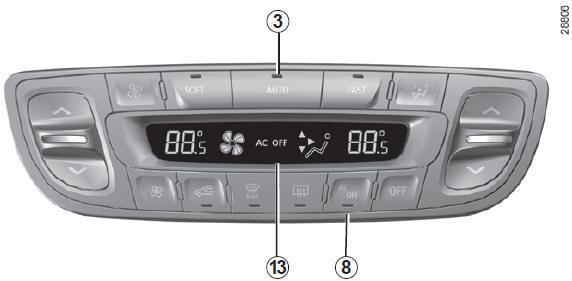
In automatic mode, the system controls switching the air conditioning on or off according to outside weather conditions.
Press button 8 to force the air conditioning off; the built-in indicator light comes on and "AC OFF" appears on display 13.
The displayed temperature values reflect a comfort level.When starting the vehicle, increasing or decreasing the displayed value will in no way reach the comfort level faster. The system always optimizes the cooling or heating process (the fan does not start instantly at maximum speed: it increases gradually). This may take from a few seconds to several minutes.
In general, unless there is a specific reason, the dashboard vents must remain open at all times.
Preferably use automatic mode by selecting one of the automatic programmes AUTO, SOFT or FAST. In automatic mode (indicator light on button 3 lit), all air conditioning functions are controlled by the system.You can still change the setting manually; in this case, the indicator light on button 3 goes off and the modified function, no longer managed by the system, is shown on display 13.
To return to automatic mode, press one of the AUTO, SOFT or FAST programs.
Rear window defrost/demist
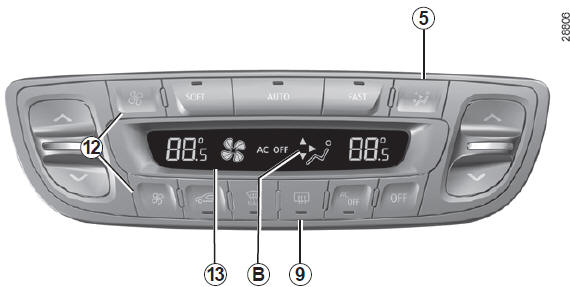
press button 9; the built-in indicator light comes on. This function quickly demists the rear window and heated mirrors (on vehicles so equipped).
To exit this function, press button 9 again. Otherwise, demisting stops automatically.
Changing the air distribution in the passenger compartment
There are five air distribution settings.
Press control 5 to cycle through them. The arrows in zone B of display 13 combine to show the selected distribution:
 The airflow is directed to the windscreen demist strips and the front side window demisters.
 The airflow is distributed between all air vents, the front side window demisters, the windscreen demist strips and the occupants' footwells.
 The airflow is mainly directed to the occupants' footwells.
 The airflow is directed to the dashboard air vents and the occupants' footwells.
 The airflow is directed to the dashboard air vents.
In this case, the air distribution in the cabin, which is no longer controlled automatically, is shown on the display.
Recycling
This function is controlled automatically, but you can also activate it manually.
Note
- during recirculation, air is taken from the cabin and recirculated without admitting outside air;
- air recirculation isolates the cabin from the outside atmosphere (driving through polluted areas, etc.);
- cools the passenger compartment more quickly.
Manual operation
Press button 11 to force air recirculation; the built-in indicator light comes on.
Prolonged use of this setting may cause odours due to lack of fresh air, as well as condensation forming on the windows.
We therefore recommend returning to automatic mode by pressing button 11 again as soon as air recirculation is no longer needed.
Switching the system off
Press button 7 to switch the system off; "OFF" appears on display 13. To restart it, press one of the controls 2, 3 or 4.
Test yourself
A quick Renault Megane quiz: every answer comes with an explanation and a link to the manual page.