Body Electrical System
AVN (Audio Video Navigation) Head Unit Repair Procedures
In this manual: Body Electrical System
7steps
~42min
2/5difficulty
Done 0 of 7
Removal
|
- Disconnect the negative (-) battery terminal.
- Remove the instrument panel upper cover. (Refer to Body - Instrument Panel Upper Cover)
- Remove the AVN head unit (A) after loosening the mounting bolts.
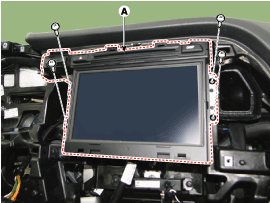
- Disconnect the connectors and cables from the AVN head unit (A).


- If the DVD does not eject, do not attempt to force it out.
- The DVD player may be damaged.
- Contact the nearest dealer for assistance.
Installation
- Install the AVN head unit after connecting the AVN head unit connectors and cable.
- Install the instrument panel upper cover.
- Connect the negative (-) battery terminal.
- Make sure the cables and connectors are connected correctly.
- Inspect the AVN system.
Test yourself
A quick Hyundai Sonata LF quiz: every answer comes with an explanation and a link to the manual page.
Was this page helpful?