Initialization
1. OIL MAINTENANCE INFORMATION MODE RESET OPERATION
NOTICE:
- When "Oil Maintenance Required Soon" is displayed, change the engine oil and perform this procedure.
- After the engine oil is changed, perform this procedure so that "Oil Maintenance Required Soon" does not display.
HINT:
The oil change maintenance system displays "Oil Maintenance Required Soon" in the multi-information display to inform the driver that it is time to change the oil based on the distance driven.
(a) Turn the ignition switch to ON, and use the ODO/TRIP switch to change the screen display to TRIP A.
(b) Turn the ignition switch off.
(c) While holding in the ODO/TRIP switch, turn the ignition switch to ON.
(d) After a 5 second count, reset will end.
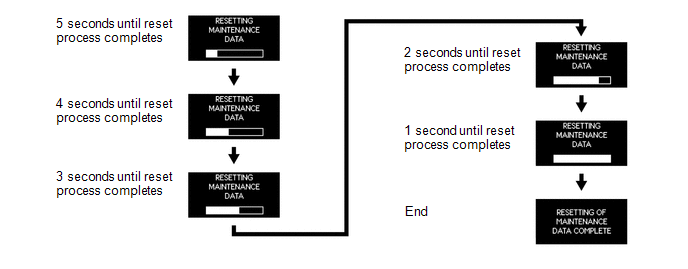
NOTICE:
- If the ignition switch is turned off during the reset operation, reset mode will be canceled.
- If the ODO/TRIP switch is turned off during the reset operation, reset mode will be canceled.
2. METHOD TO DISABLE ECO DRIVING INDICATOR LIGHT
HINT:
- The eco driving indicator light can be disabled through the customize function.
- When the eco driving indicator light is disabled, the initial check for the eco driving indicator light is not performed by the system.
(a) With the vehicle stationary or at a vehicle speed of less than 8 km/h, press and hold the DISP switch on the steering pad switch to display the meter customize mode screen.
(b) Press the DISP switch on the steering pad switch to display the "ECO LAMP" screen, and then press the DISP switch.
(c) Press the DISP switch on the steering pad switch to select "OFF", and then press the DISP switch.
HINT:
- The eco driving indicator light can be enabled by selecting "ON".
(d) Press the DISP switch on the steering pad switch to end meter customize mode.
Test yourself
A quick Toyota 4Runner quiz: every answer comes with an explanation and a link to the manual page.