Rear Speed Sensor
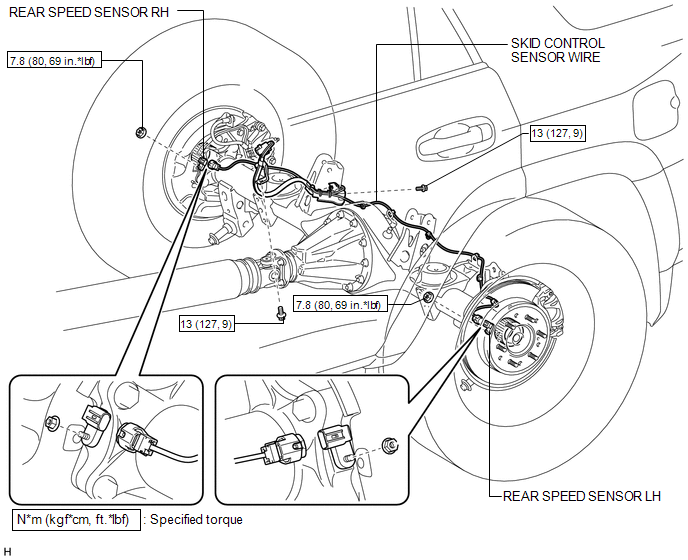
Removal REMOVAL PROCEDURE
1. REMOVE REAR WHEEL
2. REMOVE REAR SPEED SENSOR LH
(a) Disconnect the speed sensor connector. |
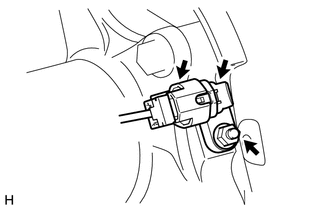 |
(b) Remove the nut and speed sensor.
NOTICE:
Pull out the sensor while trying as much as possible not to rotate it.
3. REMOVE REAR SPEED SENSOR RH
HINT:
Use the same procedure described for the LH side.
4. REMOVE SKID CONTROL SENSOR WIRE
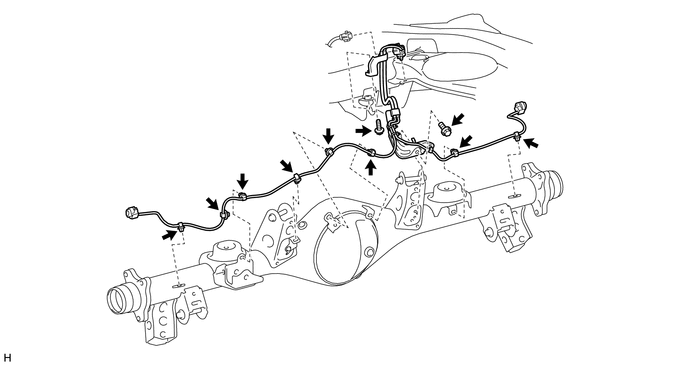
(a) Disconnect the connector.
(b) Detach the connector.
(c) Detach the 8 clamps.
(d) Remove the 2 bolts and 2 sensor clamps.
Inspection INSPECTION PROCEDURE1. CHECK REAR SPEED SENSOR
(a) Check the sensor.
Under any of the following conditions, replace the sensor with a new one:
- The surface of the sensor is cracked, dented or chipped.
- The connector is scratched, cracked or damaged.
- The sensor has been dropped.
1. INSTALL SKID CONTROL SENSOR WIRE
(a) Install the 2 sensor clamps with the 2 bolts.
Torque:
13 N·m {127 kgf·cm, 9 ft·lbf}
NOTICE:
Make sure the clamp rotation stopper touches the installation position.
(b) Connect the connector.
NOTICE:
Securely connect the connector.
(c) Attach the connector.
(d) Attach the 8 clamps.
NOTICE:
When attaching the clamps, do not twist the wire harness.
2. INSTALL REAR SPEED SENSOR LH
(a) Install the speed sensor with the nut.
Torque:
7,8 N·m {80 kgf·cm, 69 in·lbf}
NOTICE:
- Make sure there are no pieces of iron or other foreign matter attached to the sensor tip.
- While inserting the speed sensor into the axle hole, do not strike or damage the sensor tip.
- After installing the speed sensor, make sure there is no clearance or foreign matter between the sensor stay part and the axle.
- Make sure there is no foreign matter attached to the speed sensor rotor.
(b) Connect the speed sensor connector.
NOTICE:
Securely connect the connector.
3. INSTALL REAR SPEED SENSOR RH
HINT:
Use the same procedure described for the LH side.
4. INSTALL REAR WHEEL

5. CHECK SPEED SENSOR SIGNAL
(a) Check the speed sensor signal (See page
).
Test yourself
A quick Toyota 4Runner quiz: every answer comes with an explanation and a link to the manual page.