Television Camera(for Rear)
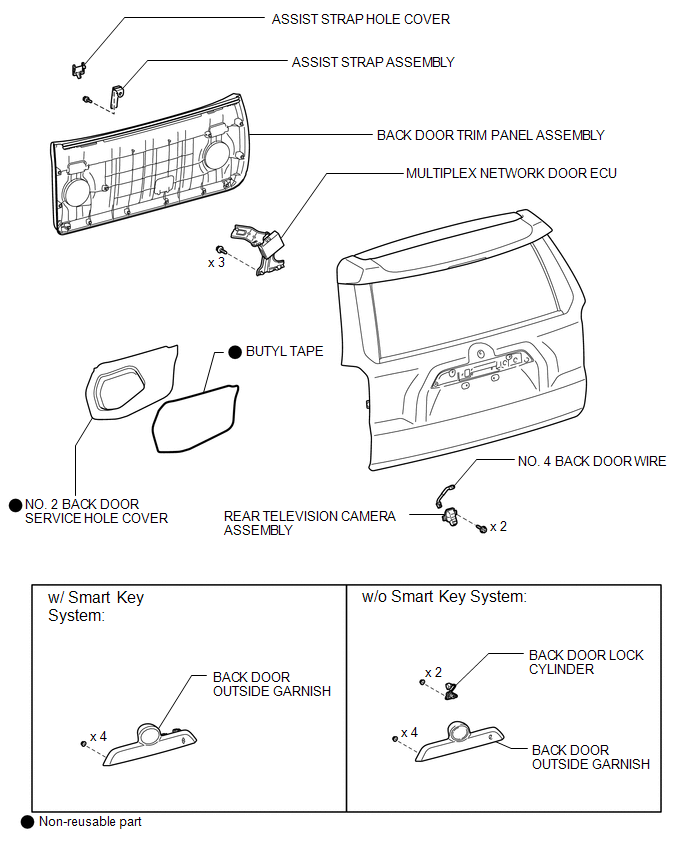
Removal REMOVAL PROCEDURE
1. REMOVE ASSIST STRAP HOLE COVER

2. REMOVE ASSIST STRAP ASSEMBLY
3. REMOVE BACK DOOR TRIM PANEL ASSEMBLY
4. REMOVE MULTIPLEX NETWORK DOOR ECU
5. REMOVE NO. 2 BACK DOOR SERVICE HOLE COVER
6. REMOVE BACK DOOR LOCK CYLINDER (w/o Smart Key System)
7. REMOVE BACK DOOR OUTSIDE GARNISH
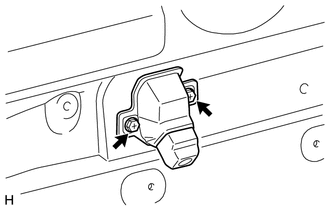
8. REMOVE REAR TELEVISION CAMERA ASSEMBLY
(a) Remove the 2 screws. |
 |
(b) Disconnect the connector. |
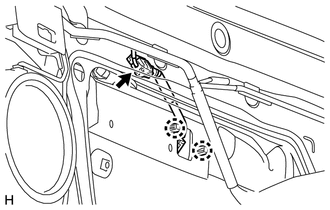 |
(c) Detach the 2 claws and remove the rear television camera assembly.
9. REMOVE NO. 4 BACK DOOR WIRE
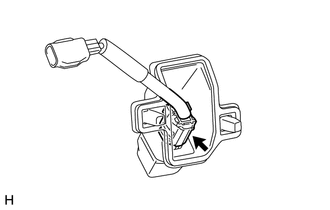
(a) Disconnect the connector and remove the No. 4 back door wire.
Installation INSTALLATION PROCEDURE1. INSTALL NO. 4 BACK DOOR WIRE
(a) Connect the connector to install the No. 4 back door wire.
2. INSTALL REAR TELEVISION CAMERA ASSEMBLY
(a) Attach the 2 claws to install the rear television camera assembly.
(b) Connect the connector.
(c) Install the 2 screws.
3. INSTALL BACK DOOR OUTSIDE GARNISH

4. INSTALL BACK DOOR LOCK CYLINDER (w/o Smart Key System)
5. INSTALL NO. 2 BACK DOOR SERVICE HOLE COVER
6. INSTALL MULTIPLEX NETWORK DOOR ECU
7. INSTALL BACK DOOR TRIM PANEL ASSEMBLY
8. INSTALL ASSIST STRAP ASSEMBLY
9. INSTALL ASSIST STRAP HOLE COVER
Test yourself
A quick Toyota 4Runner quiz: every answer comes with an explanation and a link to the manual page.