Battery Cooling Filter
Components
COMPONENTS
ILLUSTRATION
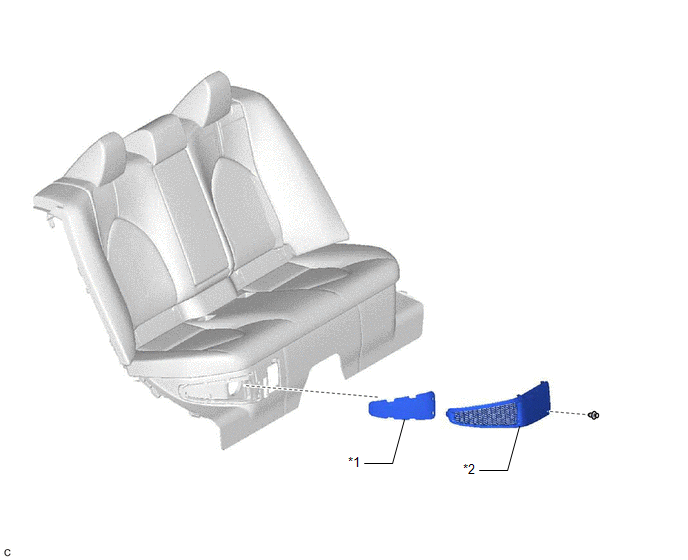
*1 |
NO. 1 HV BATTERY INTAKE FILTER |
*2 |
BATTERY SERVICE HOLE COVER |
Inspection
INSPECTION
PROCEDURE
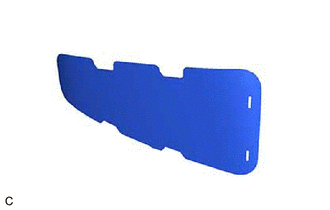
1. INSPECT NO. 1 HV BATTERY INTAKE FILTER
HINT:
- If the vehicle is used in an area with heavy traffic or excessive dust, or if the rear seat is used frequently, the No. 1 HV battery intake filter may be clogged. Clean or replace the No. 1 HV battery intake filter as necessary.
- If the message "Maintenance Required for Traction Battery Cooling Parts See Owner's Manual" is not displayed on the multi-information display, clean the No. 1 HV battery intake filter with it installed to the vehicle to prevent clogs.
(a) Visually inspect the No. 1 HV battery intake filter. Standard: No clogs or damage. NOTICE:
If the result is not as specified, replace the No. 1 HV battery intake filter. |
 |
2. CLEAN NO. 1 HV BATTERY INTAKE FILTER
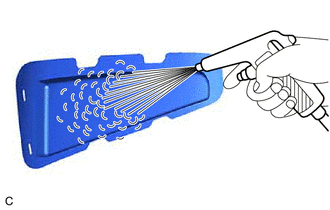
(a) When removed from the vehicle:
(1) Clean the No. 1 HV battery intake filter by blowing compressed air as shown in the illustration. NOTICE:
|
 |
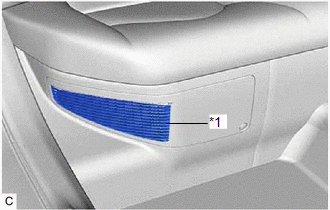
(b) When not removed from the vehicle:
(1) Clean the No. 1 HV battery intake filter using a vacuum cleaner or equivalent. NOTICE:
|
|
Installation
INSTALLATION
PROCEDURE
1. INSTALL NO. 1 HV BATTERY INTAKE FILTER
(a) Engage the 2 claws to temporarily install the No. 1 HV battery intake filter to the battery service hole cover.
(b) Engage the 3 claws to install the No. 1 HV battery intake filter to the battery service hole cover.
2. INSTALL BATTERY SERVICE HOLE COVER
(a) Engage the guide and 7 claws.
(b) Install the battery service hole cover with the clip.
3. CLEAR DTC
HINT:
If the message "Maintenance Required for Traction Battery Cooling Parts See Owner's Manual" is displayed on the multi-information display, clean or replace the No. 1 HV battery intake filter, and clear the DTCs to reset the learning values even if no DTCs are output.
Click here 
Removal
REMOVAL
PROCEDURE
1. REMOVE BATTERY SERVICE HOLE COVER
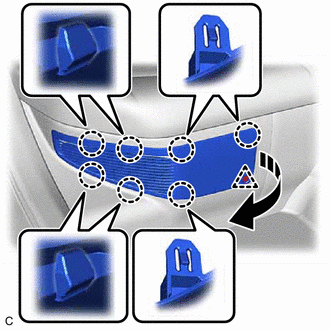
(a) Remove the clip.
 |
Remove in this Direction |
(b) Disengage the 7 claws as shown in the illustration.
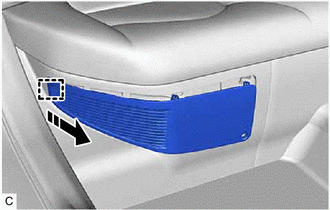
(c) Disengage the guide to remove the battery service hole cover as shown in the illustration.
|
Remove in this Direction |
2. REMOVE NO. 1 HV BATTERY INTAKE FILTER
HINT:
If the message "Maintenance Required for Traction Battery Cooling Parts See Owner's Manual" is displayed on the multi-information display, inspect the No. 1 HV battery intake filter.
Click here 
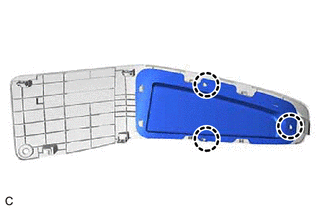
(a) Disengage the 3 claws. |
 |
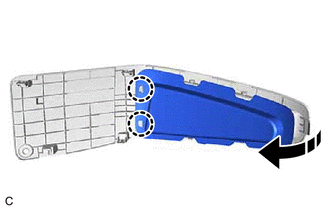
(b) Disengage the 2 claws to remove the No. 1 HV battery intake filter from the battery service hole cover as shown in the illustration.
|
Remove in this Direction |