Bluetooth Audio/Phone
Using Bluetooth® wireless communication, the following operations can be performed:
◆ Bluetooth® Audio The Bluetooth® audio system lets you listen to music played from a portable digital audio player (portable player) through the vehicle's speakers using wireless communication.
This audio system supports Bluetooth® technology, a wireless data transmission system that can play music from portable devices without the need for cables. If the portable player does not support Bluetooth® technology, the Bluetooth® audio system will not work.
◆ Bluetooth® Phone (hands-free system) This system supports Bluetooth® technology, which allows you to make or receive calls without using cables to connect the mobile phone to the system, and without operating the mobile phone itself.
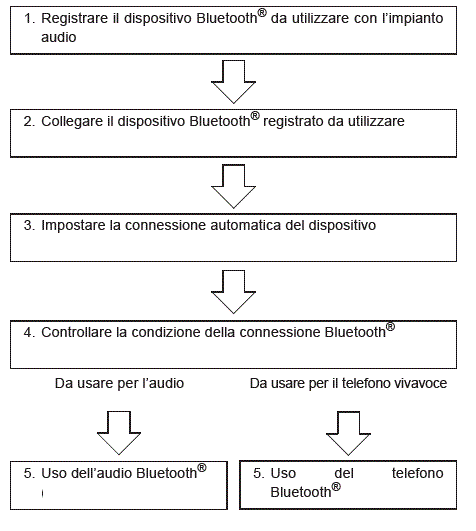
Device registration/connection procedure
Audio unit
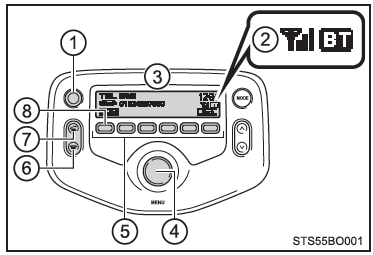
- Power/Volume knob. Press: Turns the audio system on or off. Turn: Adjusts the volume.
- Bluetooth® connection status. If "BT" is not displayed, the Bluetooth® audio/phone cannot be used.
- Display. Shows messages, names, numbers, etc.
Microphone
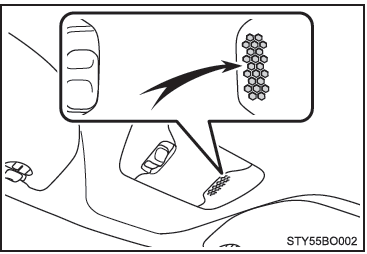
■ When the other party cannot clearly hear the conversation
- Driving on an unpaved road (generating excessive road noise).
- Driving at high speed.
- The soft top (if equipped) or the windows are open.
- The air conditioning fan noise is loud.
- The sound quality is adversely affected by the phone and/or the network being used.
Bluetooth® audio/phone menu list
To access a menu, press the "MENU" knob and turn it to move between menus.
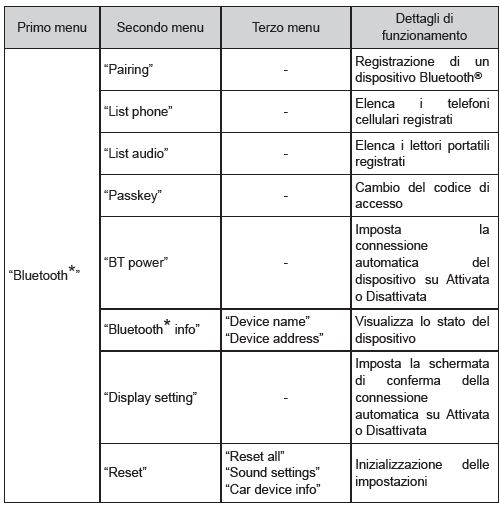
*: Bluetooth is a registered trademark of Bluetooth SIG, Inc.
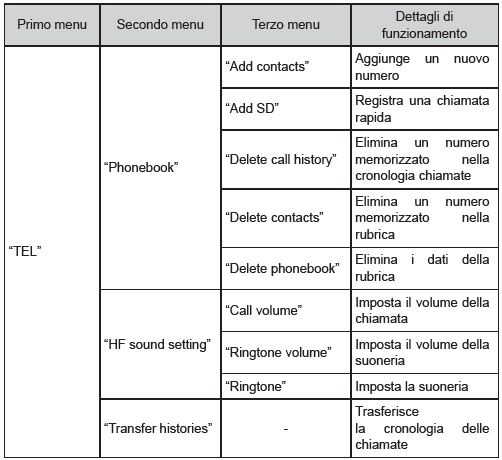
■ Bluetooth® audio/phone functions Depending on the Bluetooth® device, some functions may not be available.
Test yourself
A quick Toyota Aygo quiz: every answer comes with an explanation and a link to the manual page.