Smart entry & start system
The following operations can be performed simply by carrying the electronic key, for example in a pocket.
The driver must always carry the electronic key.
- Lock and unlock the side doors
- Lock and unlock the back door
- Start the engine
■ Antenna location
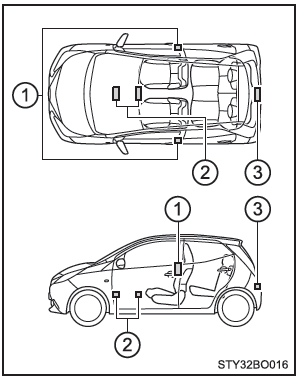
- Inside/outside cabin antennas
- Inside cabin antennas
- Luggage compartment antenna
■ Effective range (areas within which the electronic key is detected)
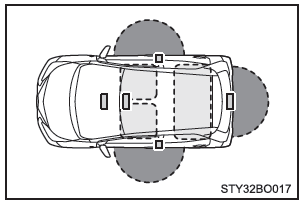
 When locking or unlocking the doors: The system can be operated when the electronic key is within approx. 0.7 m of either front door outside handle or the back door opener switch. (Only doors that detect the key can be opened or closed.)
 When starting the engine or changing the engine switch mode: The system can be activated when the electronic key is inside the vehicle.
■ Alarms and warning indicators
A combination of exterior and interior alarms and warning indicators is used to prevent vehicle theft and unforeseen accidents due to improper vehicle use. Take appropriate action based on the warning indicator that illuminates. The following table describes the circumstances and corrective actions when only the alarms operate.
| Alarm | Situation | Corrective action |
| An exterior alarm sounds once for 5 seconds | An attempt was made to lock the doors using the smart entry & start system while the electronic key was still inside the vehicle. | Remove the electronic key from the vehicle and lock the doors again. |
| An attempt was made to lock the vehicle while a door was open. | Close all doors and lock them again. | |
| The interior alarm sounds once and the exterior alarm sounds once for 5 seconds | An attempt was made to lock a door by opening it, setting the interior lock button to the lock position, and then closing the door by pulling the exterior handle while the electronic key was still inside the vehicle. | Remove the electronic key from the vehicle and lock the doors again. |
| The interior alarm sounds continuously | The engine switch was placed in ACCESSORY mode while the driver's door was open (or the driver's door was opened while the engine switch was in ACCESSORY mode). | Turn off the engine switch and close the driver's door. |
| The engine switch was turned off while the driver's door was open. | Close the driver's door. |
■ Electronic key battery saving function
If battery saving mode is set, battery drain is minimized by preventing the electronic key from receiving radio waves.
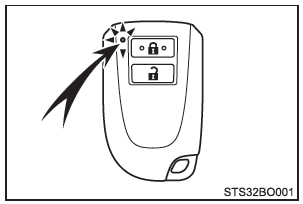
Press twice while holding down
 . Check that the electronic key indicator flashes 4 times.
If battery saving mode is set, the smart entry & start system cannot be used. To cancel the function, press any button on the electronic key
■ Conditions that may affect operation
The smart entry & start system uses weak radio waves.
The communication between the electronic key and the vehicle may be disrupted in the following situations, which may affect the operation of the smart entry & start system, the remote control and the engine immobilizer system.
(Procedures in case of malfunction:)
- When the electronic key battery is depleted
- Near television transmitters, power stations, service stations, radio stations, large displays, airports or other facilities that generate strong radio waves or electrical noise
- When the electronic key is in contact with or covered by the following metallic objects
- Cards with aluminum foil
- Cigarette packs with aluminum foil lining
- Metal wallets or bags
- Coins
- Metal hand warmers
- Media such as CDs and DVDs
- When other remote control keys (which emit radio waves) are used nearby
- When carrying the electronic key together with the following radio wave devices
- A portable radio, a mobile phone, a cordless phone or other wireless communication devices
- Electronic key or remote control key of another vehicle that emits radio waves
- Personal computer or personal digital assistant (PDA)
- Digital audio players
- Portable video game players
- If the rear window has metallic heat-reflective tint film, or if metal objects are attached to it
- When the electronic key is near a battery charger or electronic devices
■ Note for the entry function
- Even when the electronic key is within the effective range (detection areas), the system may not operate properly in the following cases:
- The electronic key is too close to the window or outside door handle, close to the ground, or in a location too high when the doors are locked or unlocked.
- The electronic key is on the instrument panel, the luggage cover (if equipped) or the floor, or in the side pockets or glove box when the engine is started or the engine switch mode is changed.
- As long as the electronic key is within the effective range, the doors can be locked or unlocked by anyone. However, only the doors that can detect the electronic key can be used to unlock the vehicle.
■ Notes for the unlocking function
- In some cases, the door will not unlock when the door handle is pulled while the lock/unlock button is pressed. In this case, return the handle to its original position, press the lock/unlock button once again and make sure the doors unlock before operating the handle again.
- If another electronic key is within the detection area, unlocking the doors after pressing the lock/unlock button may take slightly longer.
■ When the vehicle is not driven for long periods
- To prevent vehicle theft, do not leave the electronic key within 2 m (6.6 ft.) of the vehicle.
- The smart entry & start system can be deactivated in advance.
■ To ensure proper system operation When operating the system, make sure you have the electronic key with you. When operating the system from outside the vehicle, do not bring the electronic key too close to the vehicle.
Depending on the position and the way the electronic key is held, the electronic key may not be detected correctly and the system may not operate properly. (The alarm may sound accidentally or the door lock prevention function may not work.)
■ If the smart entry & start system does not operate properly
- Locking and unlocking the doors: Use the mechanical key.
- Starting the engine:
■ Discharged electronic key battery
- The standard battery life is 1 to 2 years.
- If the battery is discharging, an alarm will sound inside the cabin when the engine is stopped.
- Because the electronic key constantly receives radio waves, the battery is drained even when the electronic key is not used. The following symptoms indicate that the electronic key battery may be discharged. Replace the battery if necessary.
- The smart entry & start system or the remote control does not operate.
- The detection area becomes smaller.
- The LED indicator on the key surface does not light up.
- To prevent serious deterioration, do not keep the electronic key within 1 m (3.3 ft.) of the following electrical appliances that generate a magnetic field:
- Televisions
- Computer
- Mobile phones, cordless phones and battery chargers
- Mobile or cordless phones being charged
- Desk lamps
- Induction cookers
■ Customization that can be performed at any authorized Toyota dealer or repair shop, or other properly qualified and equipped professional Settings (e.g. smart entry & start system) can be changed.
(Customizable features:)
■ If the smart entry & start system has been deactivated by a customized setting
- Locking and unlocking the doors: Use the remote control or the mechanical key.
- Starting the engine or changing the engine switch mode:
- Stopping the engine:
WARNING
■ Warning for interference with electronic devices
- People with implanted cardiac pacemakers, cardiac resynchronization therapy pacemakers or implantable cardioverter defibrillators must keep a reasonable distance from the antennas of the Smart Entry & Start System. Radio waves could interfere with the operation of these devices. If necessary, the entry function can be disabled. For information regarding, for example, the radio wave frequency and the timing of radio wave emission, contact any authorized Toyota retailer or repairer, or another duly qualified and equipped professional. Consult your doctor about whether to disable the entry function.
- People using electrically powered medical devices other than implantable cardiac pacemakers, cardiac resynchronization therapy pacemakers or implantable cardioverter defibrillators must consult the device manufacturers for information on how these devices may be affected by radio waves.
Ask any authorized Toyota retailer or repairer, or another duly qualified and equipped professional, for detailed information on how to disable the entry function.
Test yourself
A quick Toyota Aygo quiz: every answer comes with an explanation and a link to the manual page.