Instruments and controls
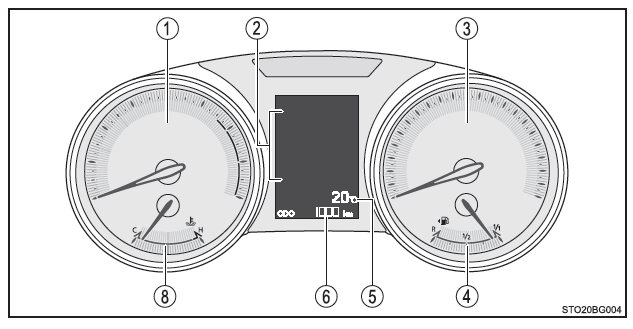
Vehicles with monochrome display
Vehicles with color display
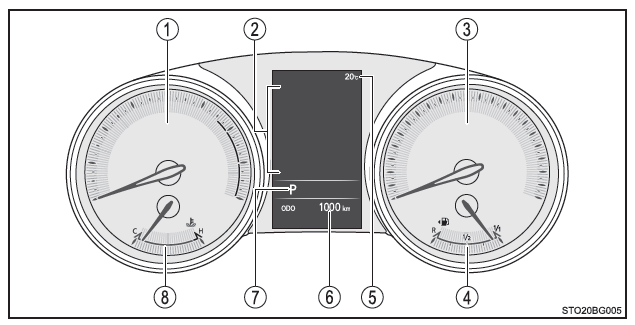
The units used for the speedometer may differ depending on the region where the vehicle is sold.
- Tachometer
Shows the engine speed in revolutions per minute. - Multi-information display
Provides the driver with various information related to vehicle operation.Displays warning messages in case of a malfunction.
- Speedometer
Shows the vehicle speed. - Fuel gauge
Shows the amount of fuel remaining in the fuel tank. - Outside temperature display
Displays the outside temperature in the range of -40ºC (-40ºF) to 50ºC (122ºF). The low outside temperature indicator comes on when the outside temperature is below 3ºC (37ºF). - Odometer and trip meter display
Displays the following information.Odometer: Shows the total distance the vehicle has traveled.
Trip meter: Shows the distance the vehicle has traveled since the trip meter was last reset. Trip meters A and B allow you to record and display different distances independently.
Maintenance information: Shows the distance remaining until the next engine oil change. If "-" is displayed in front of the distance, the oil change is overdue. Have the engine oil replaced by a Toyota dealer, a Toyota authorized repairer, or any reliable repairer.
- Displays maintenance information when the ignition switch is set to "ON" (vehicles without a smart entry & start system) or to IGNITION ON mode (vehicles with a smart entry & start system).
- How to reset maintenance information
- Shift position and gear range display (color display)
Shows the selected shift position or the selected gear range. - Engine coolant temperature gauge
Shows the engine coolant temperature.
Selecting the display
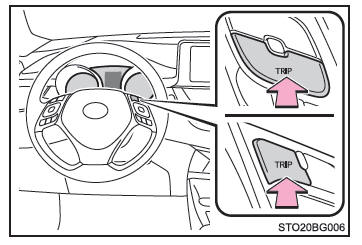
Press the "TRIP" button to switch between the odometer and trip meter displays.
When the trip meter is displayed, press and hold the "TRIP" button to reset it.
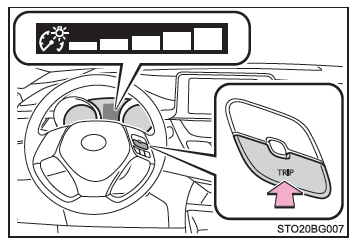
Instrument cluster brightness control (monochrome display)
You can adjust the brightness of the instrument cluster lights (when the light switch is on).
Press the "TRIP" button to display the instrument cluster brightness control.
Then, press and hold the button.
Press the button to adjust the brightness to the desired level.
■ Conditions for the instrument and display screen lighting Vehicles without a smart entry & start system: The ignition switch is set to "ON".
Vehicles with a smart entry & start system: The engine switch is in IGNITION ON mode.
■ Outside temperature display
- In the following situations, the exact outside temperature may not be displayed, or the display may take longer than usual to respond.
- When stopped or driving at low speed (below 25 km/h [16 mph])
- When the outside temperature changes suddenly (entering or leaving a garage, driving through a tunnel, etc.)
- If "--" is displayed, the system may be malfunctioning.
Have your vehicle inspected by a Toyota dealer, a Toyota-authorized repairer, or any reliable repairer.
■ To avoid damage to the engine and its components
- Do not let the tachometer needle enter the red zone, which indicates the engine's maximum speed.
- The engine may overheat if the coolant temperature gauge is in the red zone ("H"). In this case, stop the vehicle immediately in a safe place and check the engine once it has cooled down completely.