Customization
Customizable features
Your vehicle has many electronic features, some of which can be customized to your personal preferences.
You can change the settings of these features using the multi-information display, the multimedia/navigation system screen, or by having the work done by a Toyota dealer, a Toyota-approved repairer, or any reliable repairer.
Customizing vehicle features
■ Changing settings using the multi-information display
Vehicles with monochrome display
1. With the vehicle stopped, press the "DISP" button to display the setup screen, then press and hold the "DISP" button to display the customization mode screen.
2. Press the "DISP" button and select the option, then press and hold the "DISP" button.
3. Press the "DISP" button and select the setting you want, then press and hold the "DISP" button.
To exit customization mode, press the "DISP" button to select the "EXIT" option, then press and hold the "DISP" button.
Vehicles with color display
1. Press the or the instrument panel selector, select
 .
2. Press or the instrument panel selector, select "Display settings", then press
 .
3. Press or the instrument panel selector, select the option, then press
 .
4. Press or the instrument panel selector, select the setting you want, then press
 .
To return to the previous screen or exit customization mode, press .
■ Changing settings on the multimedia or navigation system screen (vehicles equipped with a multimedia or navigation system)
1. Press the .
2. Select "Vehicle" on the "Settings" screen.
Select the option you want.
Several settings can be changed. See the list of changeable settings for details.
Customizable features
The settings of some features are automatically changed when others are customized. Contact a Toyota dealer, a Toyota-approved repairer, or any reliable repairer for details.
- Features customizable using the multi-information display
- Settings changeable using the multimedia or navigation system screen (vehicles equipped with a multimedia or navigation system)
- Settings changeable by your Toyota dealer
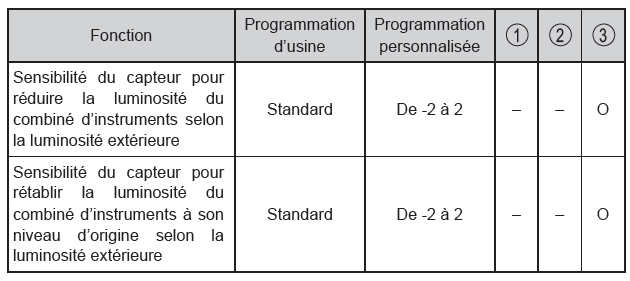
Symbol definitions: O = Available, - = Not available
■ Gauges, meters and multi-information display
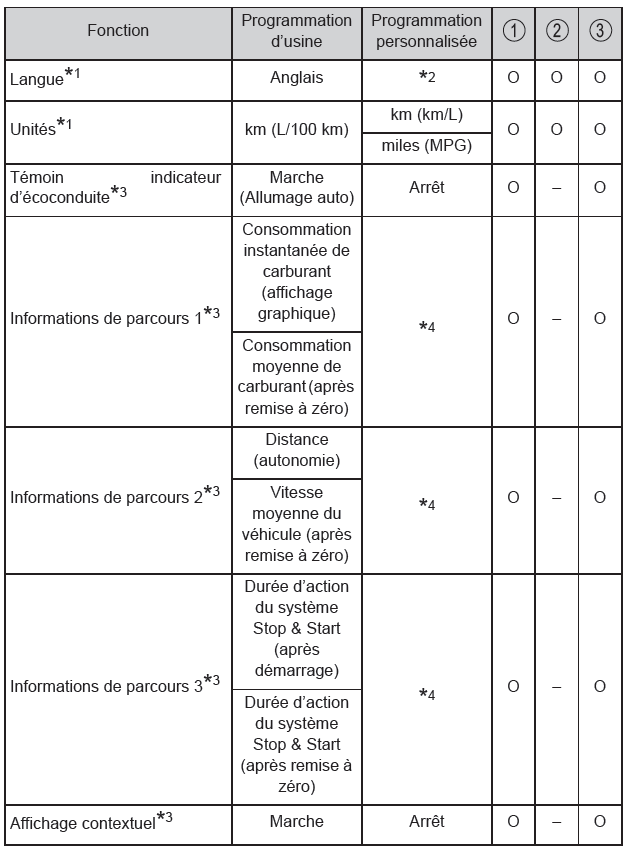
*1: Factory setting varies by country.
*2: Monochrome display vehicles:
French, German, Spanish, Italian, Portuguese, Russian, Turkish
Color display vehicles:
German, French, Spanish, Italian, Portuguese, Dutch, Swedish, Norwegian, Danish, Russian, Finnish, Greek, Polish, Ukrainian, Turkish, Hungarian, Czech, Slovak, Romanian
*3: Color display vehicles only.
*4: 2 options from the following: instantaneous fuel consumption (graphic display), instantaneous fuel consumption (digital display), average fuel consumption (after reset), average fuel consumption (after start), average fuel consumption (after refueling), average vehicle speed (after reset), average vehicle speed (after start), elapsed time (after reset), elapsed time (after start), distance (range), distance (after start), blank.
■ Instrument cluster
■ "Hands-free" entry and start system* and remote central locking
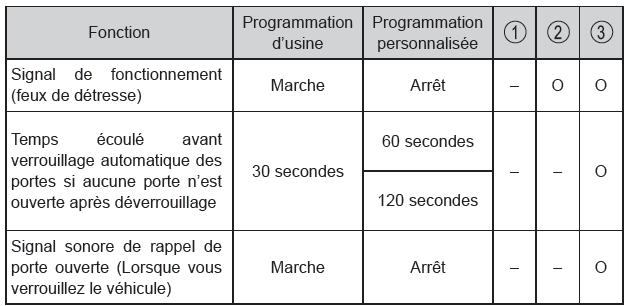
*: If equipped
■ "Hands-free" entry and start system*1
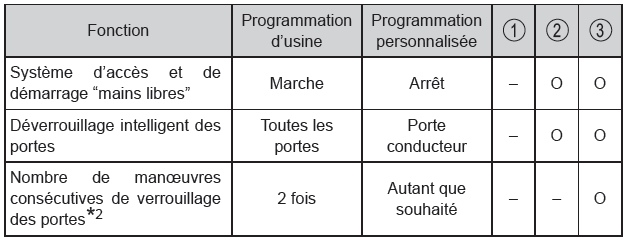
*1: On equipped models
*2: For vehicles without an alarm
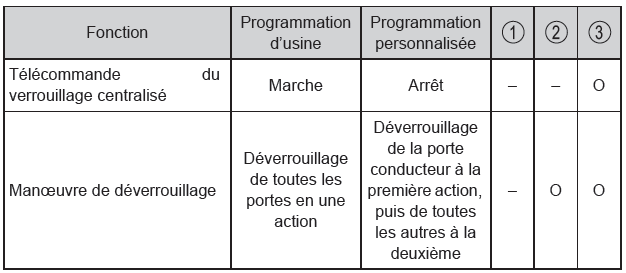
■ Remote keyless entry
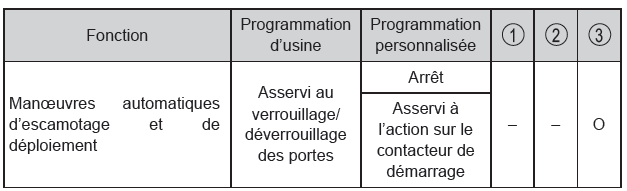
■ Outside rear view mirrors
■ Power windows
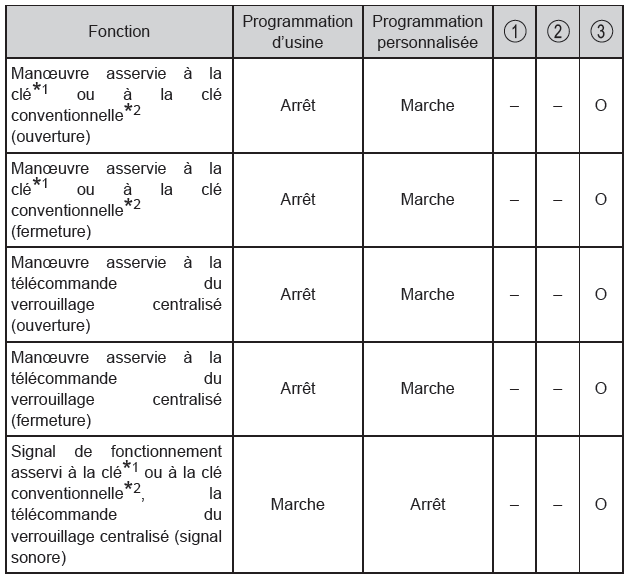
*1: Vehicles without a hands-free access and start system
*2: Vehicles equipped with a hands-free access and start system
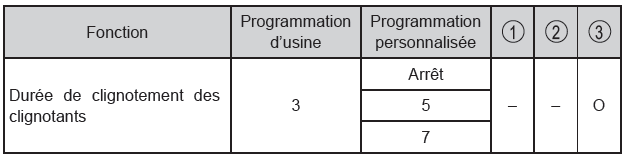
■ Turn signal lever
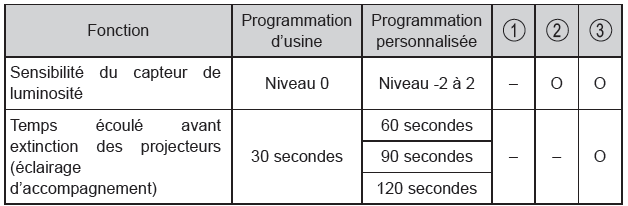
■ Automatic light control system
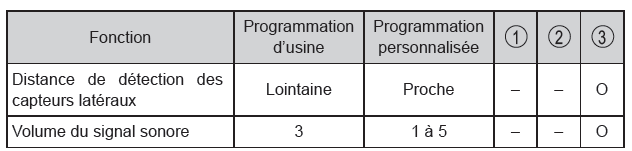
■ Toyota Parking Support Sensors*
*: If equipped
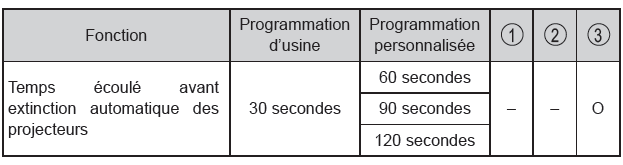
■ Follow-me lighting system
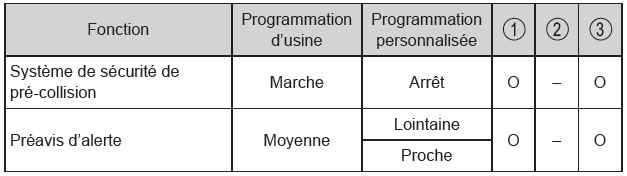
■ PCS (Pre-Collision System)*
*: If equipped
■ LDA (Lane Departure Alert) with Steering Assist*
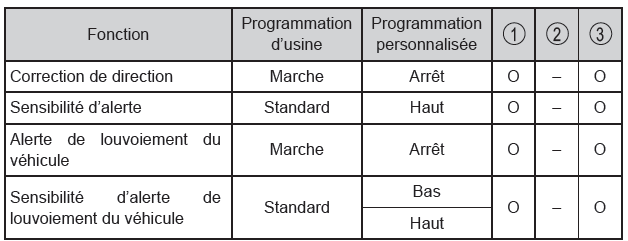
*: If equipped
■ RSA (Road Sign Assist)*
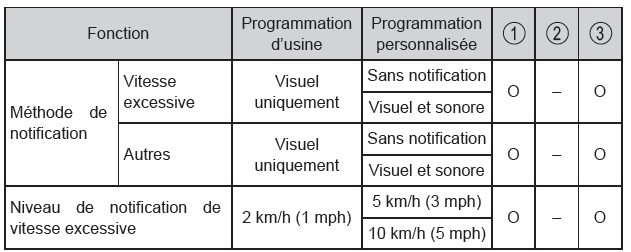
*: If equipped
■ Stop & Start system*
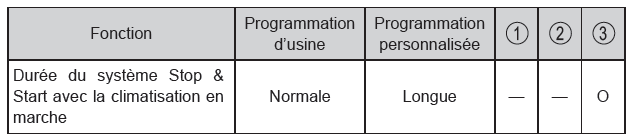
*: If equipped
■ Automatic air conditioning system*
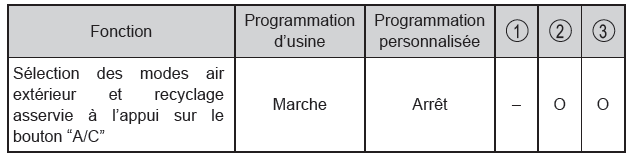
*: If equipped
■ Lighting
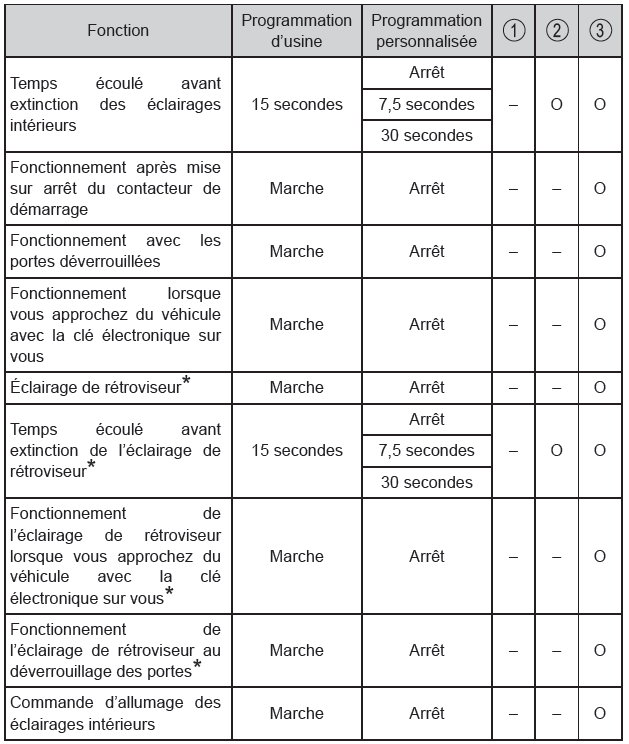
*: If equipped
■ The customization mode for setting functions via the multi-information display is automatically canceled in the following situations
- A warning message appears after the customization mode screen is displayed.
- You turn the engine switch off.
- The vehicle starts to move while the customization mode screen is displayed.
■ During customization Since the engine must be running to customize functions, make sure the vehicle is parked in a well-ventilated area. In an enclosed space such as a garage, harmful carbon monoxide (CO) in the exhaust gas may build up and enter the cabin. This could result in serious health problems or death.
NOTE■ During customization To prevent the battery from discharging, make sure the engine is running while you customize the functions.