Changing the display
The multi-information display is operated using the meter control switches.
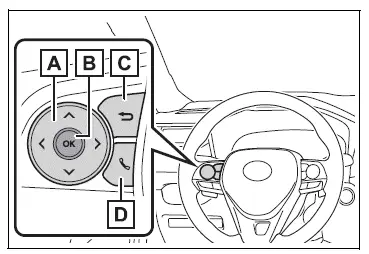
- Scroll the screen*/switch the display*/move the cursor
- Press: Enter/Set
Press and hold: Reset/Display customizable items - Return to the previous screen
- Call sending/receiving and history display (if equipped) Linked with the hands-free system, sending or receiving call is displayed. For details regarding the hands-free system, refer to "MULTIMEDIA OWNER'S MANUAL".
*: On screens where the screen can be scrolled and the display can be switched, a scroll bar or a round icon that shows the number of registered screens is displayed.
WARNING
■Caution for use while driving
For safety, avoid operating the meter control switches while driving as much as possible, and do not look continuously at the multi-information display while driving.
Stop the vehicle and operate the meter control switches. Failure to do so may cause a steering wheel operation error, resulting in an unexpected accident.
Menu icons
Information related to each icon can be displayed by selecting the icon with the meter control switches.
Some of the information may be displayed automatically depending on the situation.
 Driving information display
 Driving support system
information display
 Audio system-linked display
(if equipped)
 Vehicle information display
 Settings display
 Warning message display
Test yourself
A quick Toyota RAV4 quiz: every answer comes with an explanation and a link to the manual page.