Vehicle status information and indicators
Display contents
In this manual: Vehicle status information and indicators
~1min read
Following information is displayed on the multi-information display.
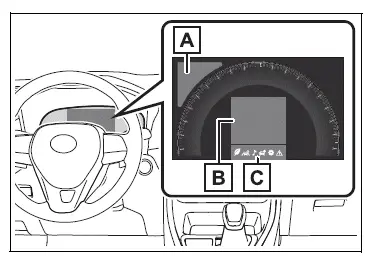
- Driving support system information
Displays recognized signs while the RSA system (if equipped) is operating.
Displays an image when the following systems are operating and a menu icon other than  is
selected:
- LTA (Lane Tracing Assist)
- Dynamic radar cruise control with full-speed range
- Information display area
A variety of information can be displayed by selecting a menu icon.
Additionally, warning or suggestion/ advice pop-up displays will be displayed in some situations.
- Menu icons
■The multi-information display is displayed when
The engine switch is in ON.
■When changing driving mode
- Background color of the multi-information display is changed following the selected driving mode.
- AWD models: Background color of the multi-information display is changed following the selected driving mode or Multi-terrain Select mode.
■Liquid crystal display
Small spots or light spots may appear on the display. This phenomenon is characteristic of liquid crystal displays, and there is no problem continuing to use the display.
WARNING
■Caution for use while driving
- When operating the multi-information display while driving, pay extra attention to the safety of the area around the vehicle.
- Do not look continuously at the multi-information display while driving as you may fail to see pedestrians, objects on the road, etc. ahead of the vehicle.
Test yourself
A quick Toyota RAV4 quiz: every answer comes with an explanation and a link to the manual page.
Was this page helpful?