Driving information display
Select to display fuel consumption data in various forms.
■ Fuel Economy
Following information is displayed.
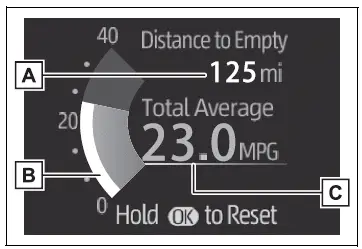
- Distance to empty
Displays the driving range with remaining fuel. - Current fuel economy Displays the instantaneous current fuel Economy.
- Average fuel economy Displays the average fuel economy since the function was reset or the

average fuel economy after starting or refueling.*1, 2, 3
The average fuel economy selected by "Fuel Economy" on the screen is displayed.
 .
*3:Average fuel economy after starting is reset each time the engine stops.
■ Eco Driving Indicator/Distance to empty
Display contents
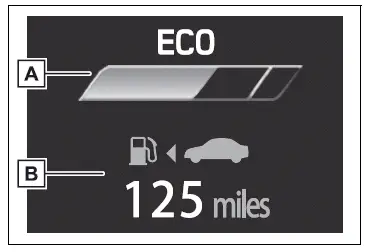
- Eco Driving Indicator
- Distance to empty
Displays the driving range with remaining fuel.
Eco Driving Indicator
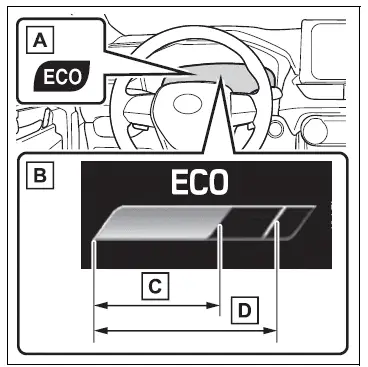
- Eco Driving Indicator Light
During Eco-friendly acceleration operation (Eco driving), the Eco Driving Indicator Light will turn on.
When the acceleration exceeds Zone of Eco driving, or when the vehicle is stopped, the light turns off.
- Eco Driving Indicator Zone Display
Suggests the Zone of Eco driving with current Eco driving ratio based on acceleration.
- Eco driving ratio based on acceleration
If the acceleration exceeds Zone of Eco driving, the right side of Eco Driving Indicator Zone Display will illuminate.
At this time, the Eco Driving Indicator Light will turn off.
- Zone of Eco driving
■Distance to empty
- This distance is computed based on your average fuel consumption.
As a result, the actual distance that can be driven may differ from that displayed.
- When only a small amount of fuel is added to the tank, the display may not be updated. When refueling, turn the engine switch to OFF.
If the vehicle is refueled without turning the engine switch to OFF, the display may not be updated.
- When "Refuel" is displayed, the remaining fuel amount is low and the distance that can be driven with the remaining fuel cannot be calculated.
Refuel immediately.
■The ECO Driving indicator will not operate when
Eco Driving Indicator will not operate in the following conditions:
- The shift lever is in any position other than D.
- Neither normal mode nor Eco drive mode is selected.
- The vehicle speed is approximately 130 km/h or higher.
Driving support system information display
■ Driving support system information display
Select to display the operational status of the following systems:
- LTA (Lane Tracing Assist)
- Dynamic radar cruise control with full-speed range
- RSA (Road Sign Assist) (if equipped)
Navigation system-linked display (if equipped)
Select to display the following navigation system-linked information.
- Route guidance
- Compass display
Audio system-linked display (if equipped)
Select to enable selection of an audio source or track on the display.
Test yourself
A quick Toyota RAV4 quiz: every answer comes with an explanation and a link to the manual page.