Vehicle information display
■ Drive information
2 items that are selected using the "Drive Info Items" setting (average speed, distance and total time) can be displayed vertically.
The displayed information changes according to the "Drive Info Type" setting (since the system was started or between resets).
Use the displayed information as a reference only.
Following items will be displayed.
- "Trip"
- "Average Speed": Displays the average vehicle speed since engine start*
- "Distance": Displays the distance driven since engine start*
- "Total Time": Displays the elapsed time since engine start*
*: These items are reset each time the engine stops.
- "Total"
- "Average Speed": Displays the average vehicle speed since the display was reset*
- "Distance": Displays the distance driven since the display was reset*
- "Total Time": Displays the elapsed time since the display was reset*
*: To reset, display the desired item and press and hold  .
■ AWD system display (AWD models)
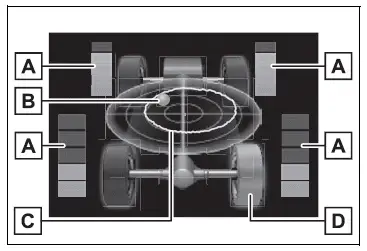
- Torque distribution display Displays the drive status of each wheel in 6 steps from 0 to 5.
- G-force display*
Displays the size and direction of the G-force applied to the vehicle via changes to the position of the ball on the display. - Maximum G-force course* This item is linked with the G-force display and the course of the past movement of the ball is displayed.
Press and hold
 to reset the
record. - Wheel spin display
When a tire is spinning, its icon on the display changes its color and blinks.
*: This item is displayed only when driving mode is set to sport mode.
The illustration used is intended as an example, and may differ from the image that is actually displayed on the multi-information display.
Test yourself
A quick Toyota RAV4 quiz: every answer comes with an explanation and a link to the manual page.