Front occupant classification sensor rh collision detection

Description
Dtc b1786 is output when the occupant classification ecu receives a collision detection signal sent by the front occupant classification sensor rh when an accident occurs.
Dtc b1786 is also output when the front seat assembly rh is subjected to a strong impact, even if an actual accident does not occur.
However, when the occupant classification ecu outputs a collision detection signal, even if the vehicle is not in a collision, dtc b1786 can be cleared by performing the zero point calibration and sensitivity check.
Therefore, when dtc b1786 is output, first perform the zero point calibration and sensitivity check.

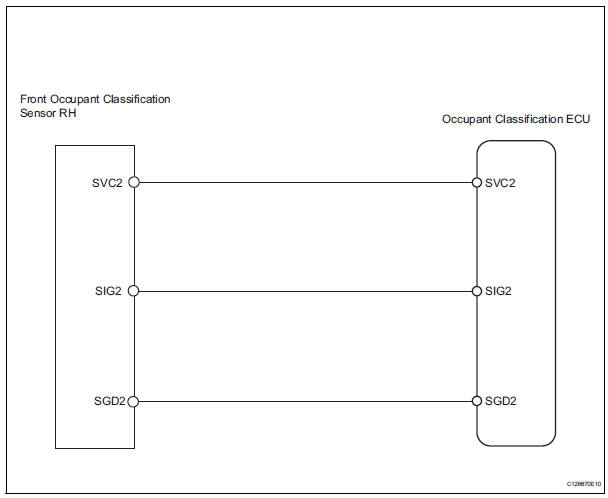
Wiring diagram
Inspection procedure
- Perform zero point calibration
- Connect the intelligent tester to the dlc3.
- Turn the ignition switch on.
- Using the intelligent tester, perform the zero point calibration (see page rs-241).


- Perform sensitivity check
- Using the intelligent tester, perform the sensitivity check (see page rs-241).


- Check for dtc
- Turn the ignition switch on.
- Clear the dtcs (see page rs-249).
First clear dtcs stored in the occupant classification ecu and then in the center airbag sensor.
- Turn the ignition switch off.
- Turn the ignition switch on.
- Check the dtcs (see page rs-249).
Dtcs other than dtc b1786 may be output at this time, but they are not related to this check.


- Replace front seat assembly rh
- Turn the ignition switch off.
- Disconnect the cable from the negative (-) battery terminal, and wait for at least 90 seconds.
- Replace the front seat rh (see page se-8).
Perform the inspection using parts from a normal vehicle if possible.

- Perform zero point calibration
- Connect the cable to the negative (-) battery terminal, and wait for at least 2 seconds.
- Connect the intelligent tester to the dlc3.
- Turn the ignition switch on.
- Using the intelligent tester, perform the zero point calibration (see page rs-241).


- Perform sensitivity check
- Using the intelligent tester, perform the sensitivity check (see page rs-241).


- Check for dtc
- Turn the ignition switch on.
- Clear the dtcs (see page rs-249).
First clear dtcs stored in the occupant classification ecu and then in the center airbag sensor.
- Turn the ignition switch off.
- Turn the ignition switch on.
- Check the dtcs (see page rs-249).
Dtcs other than dtc b1786 may be output at this time, but they are not related to this check.


- Replace occupant classification ecu
- Turn the ignition switch off.
- Disconnect the cable from the negative (-) battery terminal, and wait for at least 90 seconds.
- Replace the occupant classification ecu (see page rs- 392).

- Perform zero point calibration
- Connect the cable to the negative (-) battery terminal, and wait for at least 2 seconds.
- Connect the intelligent tester to the dlc3.
- Turn the ignition switch on.
- Using the intelligent tester, perform the zero point calibration (see page rs-241).

- Perform sensitivity check
- Using the intelligent tester, perform the sensitivity check (see page rs-241).

End
Test yourself
A quick Toyota RAV4 quiz: every answer comes with an explanation and a link to the manual page.