Air conditioning
Room temperature sensor (for automatic ai conditioning system)
In this manual: Air conditioning
19steps
~114min
4/5difficulty
Done 0 of 19
Components
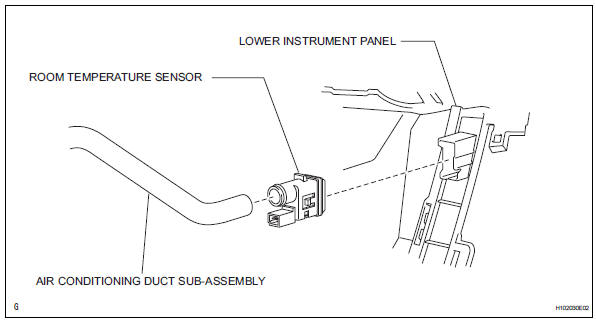
Removal
Notice:
Removal
- Remove lower instrument panel
- Remove the lower instrument panel (see page ip- 16).
- Remove room temperature sensor
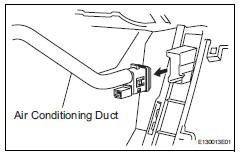
- Disconnect the duct.
- Disconnect the connector.
- Detach the claws and remove the sensor.
- Inspect room temperature sensor
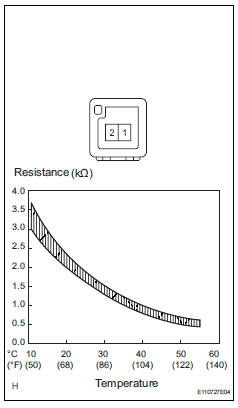
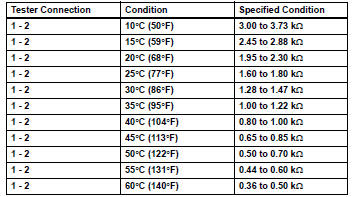
- Measure the resistance of the sensor.
Notice:
- Touching the sensor even slightly may change the resistance value. Hold the connector of the sensor.
- When measuring the resistance, the sensor temperature must be the same as the ambient temperature.
As the temperature increases, the resistance decreases (see the graph).
If the result is not as specified, replace the room temperature sensor.
Installation- Install room temperature sensor
- Attach the claws to install the sensor.
- Connect the connector.
- Connect the duct.
- Install lower instrument panel
- Install the lower instrument panel (see page ip-23).
- Install ambient temperature sensor
- Connect the connector, and then push in the sensor.
- Install front bumper cover
- Install the front bumper cover (see page et-10).
- Connect cable to negative battery terminal
- Check srs warning light
- Check srs warning light (see page rs-37).
Test yourself
A quick Toyota RAV4 quiz: every answer comes with an explanation and a link to the manual page.
Was this page helpful?