Sensor detection display, object distance
■ Detection range of the sensors
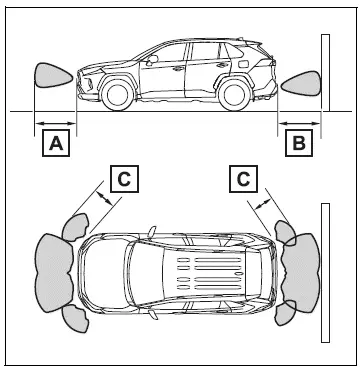
- Approximately 3.3 ft. (100 cm)
- Approximately 4.9 ft. (150 cm)
- Approximately 2.1 ft. (63 cm)
The diagram shows the detection range of the sensors. Note that the sensors cannot detect objects that are extremely close to the vehicle.
The range of the sensors may change depending on the shape of the object, etc.
■ Distance display
When an object is detected by a sensor, the approximate distance to the object will be displayed on the multi-information display or Multimedia Display. (As the distance to the object becomes short, the distance segments may blink.) The images may differ from that shown in the illustrations.
- Approximate distance to object
- Front center sensor: 3.3 ft. (100 cm) to 2.1 ft. (63 cm)
- Rear center sensor: 4.9 ft. (150 cm) to 2.1 ft. (63 cm)
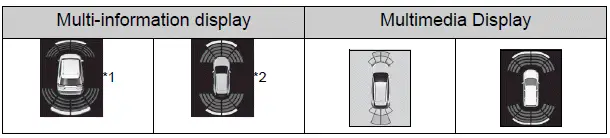
*1:Vehicles with 7-inch multi-information display *2:Vehicles with 12.3-inch multi-information display
- Approximate distance to object: 2.1 ft. (63 cm) to 1.6 ft. (48 cm)
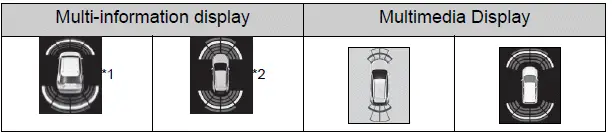
*1:Vehicles with 7-inch multi-information display *2:Vehicles with 12.3-inch multi-information display
Approximate distance to object: 1.6 ft. (48 cm) to 1.1 ft. (34 cm)

*1:Vehicles with 7-inch multi-information display *2:Vehicles with 12.3-inch multi-information display
- Approximate distance to object: 1.1 ft. (34 cm) to 0.5 ft. (15 cm)
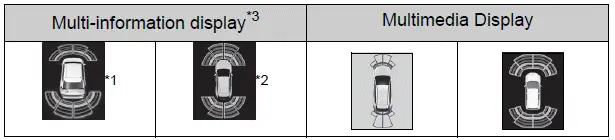
*1:Vehicles with 7-inch multi-information display *2:Vehicles with 12.3-inch multi-information display *3:The distance segments will blink slowly.
- Approximate distance to object: Less than 0.5 ft. (15 cm)
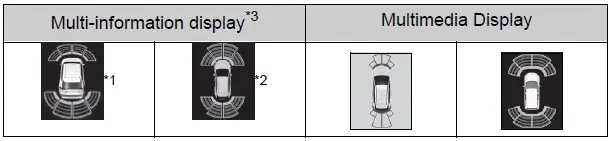
*1:Vehicles with 7-inch multi-information display *2:Vehicles with 12.3-inch multi-information display *3:The distance segments will blink rapidly.
■ Buzzer operation and distance to an object
A buzzer sounds when the sensors are operating.
- The buzzer beeps faster as the vehicle approaches an object.
When the vehicle comes within approximately 1.1 ft. (34 cm) of the object, the buzzer sounds continuously.
- When 2 or more sensors simultaneously detect a static object, the buzzer sounds for the nearest object.
- Even when the sensors are operating, the buzzer will be muted in some situations.
(automatic buzzer mute function)
■Muting the buzzer sound
- Automatic buzzer mute function
Even when the sensors are operating, the buzzer will be muted in the following situations:
- The distance between the vehicle and the detected object does not become shorter (except when the distance between the vehicle and object is 1.1 ft. [34 cm] or less).
- Your vehicle is moving away from the object.
- There are no detectable objects entering the path of your vehicle.
However, if another object is detected or the situation changes while the buzzer is muted, the buzzer begins sounding again.
- To mute the buzzer sound
The buzzer can be temporarily muted by pressing  of the meter
control switches while a suggestion that says mute is available is shown on the multi-information display.
- When the mute is canceled
Mute will be automatically canceled in the following situations.
- When the shift position is changed
- When the vehicle speed has reached or exceeded a certain speed
- When the Intuitive parking assist is turned off once and turned on again
- When the engine switch is turned off once and turned to ON again
■Customization
The buzzer volume can be adjusted on the multi-information display.
Test yourself
A quick Toyota RAV4 quiz: every answer comes with an explanation and a link to the manual page.