Enabling/Disabling the Parking Support Brake
The Parking Support Brake can be enabled/disabled on the 
screen of the multi-information display. All of the Parking Support Brake functions (static objects and rear-crossing vehicles) are enabled/disabled simultaneously. When the Parking Support Brake is disabled, the PKSB OFF indicator illuminates on the multi-information display.
To re-enable the system, select 
on the multi-information display, select  and
turn it on.
If the system is disabled, it will remain off even if the engine switch is turned to ON after the engine switch has been turned off.
Display and buzzer for engine output restriction control and brake control
If the engine output restriction control or brake control operates, a buzzer will sound and a message will be displayed on the multi-information display or Multimedia Display, to alert the driver.
Depending on the situation, engine output restriction control will operate to either limit acceleration or restrict output as much as possible.
- Engine output restriction control is operating (acceleration restriction)
Acceleration greater than a certain amount is restricted by the system.
Multimedia Display: No warning displayed
Multi-information display: "Object Detected Acceleration Reduced"
PKSB OFF indicator: Not illuminated Buzzer: Does not sound
- Engine output restriction control is operating (output restricted as much as possible)
The system has determined that stronger-than-normal brake operation is necessary.
Multimedia Display: "BRAKE!"
Multi-information display: "BRAKE!" PKSB OFF indicator: Not illuminated
Buzzer: Short beep
Brake control is operating
The system determined that emergency braking is necessary.
Multimedia Display: "BRAKE!" Multi-information display: "BRAKE!" PKSB OFF indicator: Not illuminated
Buzzer: Short beep
- Vehicle stopped by system operation
The vehicle has been stopped by brake control operation.
Multimedia Display: "Press Brake Pedal"
Multi-information display: "Switch to Brake" (If the accelerator pedal is not depressed, "Press Brake Pedal" will be displayed.)
PKSB OFF indicator: Illuminated
Buzzer: Short beep
System overview
If the Parking Support Brake determines that a collision with a detected object is possible, the engine output will be restricted to restrain any increase in the vehicle speed. (Engine output restriction control: See figure 2.) Additionally, if the accelerator pedal continues to be depressed, the brakes will be applied automatically to reduce the vehicle speed. (Brake control: See figure 3.)
- Figure 1: When the PKSB
(Parking Support Brake) is not operating

- Engine output
- Braking force
- Time
- Figure 2: When engine output restriction control operates
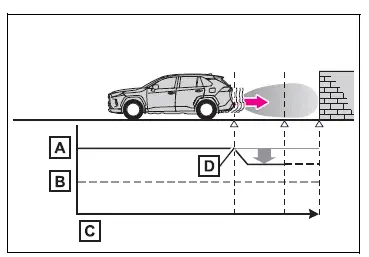
- Engine output
- Braking force
- Time
- Engine output restriction control begins operating (System determines that possibility of collision with detected object is high)
- Figure 3: When engine output restriction control and brake control operates
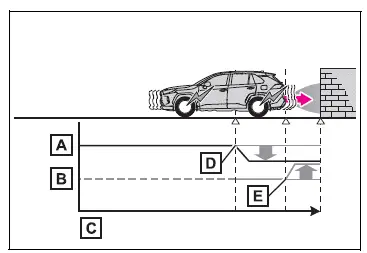
- Engine output
- Braking force
- Time
- Engine output restriction control begins operating (System determines that possibility of collision with detected object is high)
- Brake control begins operating (System determines that possibility of collision with detected object is extremely high)
■If the Parking Support Brake has operated
If the vehicle is stopped due to operation of the Parking Support Brake, the Parking Support Brake will be disabled and the PKSB OFF indicator will illuminate. If the Parking Support Brake operates unnecessarily, brake control can be canceled by depressing the brake pedal or waiting for approximately 2 seconds for it to automatically be canceled.
Then, the vehicle can be operated by depressing the accelerator pedal.
■Re-enabling the Parking Support Brake
To re-enable the Parking Support Brake when it is disabled due to operation of the Parking Support Brake, either enable the system again, or turn the engine switch to OFF and then back to ON.
Additionally, if the object becomes no longer in the traveling direction of the vehicle or if the traveling direction of the vehicle changes (such as changing from moving forward to backing up, or from backing up to moving forward), the system will be re-enabled automatically.
■If "PKSB Unavailable" is displayed on the multi-information display and the PKSB OFF indicator is flashing
If this message is displayed, a sensor on the front or rear bumper may be dirty. Clean the sensors and their surrounding area on the bumpers.
■If "PKSB Unavailable" and "Parking Assist Unavailable Clean Parking Assist Sensor" are displayed on the multi-information display and the PKSB OFF indicator is flashing
- A sensor may be covered with ice, snow, dirt, etc. In this case, remove the ice, snow, dirt, etc., from the sensor to return the system to normal. If this message is shown even after removing dirt from the sensor, or shown when the sensor was not dirty to begin with, have the vehicle inspected at your Toyota dealer.
- A sensor may be frozen. Once the ice melts, the system will return to normal.
- Water may be continuously flowing over the sensor surface, such as in a heavy rain. When the system determines that it is normal, the system will return to normal.
■If a battery terminal has been disconnected and reconnected
The system needs to be initialized.
To initialize the system, drive the vehicle straight ahead for 5 seconds or more at a speed of approximately 35 km/h or more.
Test yourself
A quick Toyota RAV4 quiz: every answer comes with an explanation and a link to the manual page.