Canceling and resuming the speed control

- Pressing the cancel switch cancels the speed control.
The speed control is also canceled when the brake pedal is depressed.
(When the vehicle has been stopped by system control, depressing the brake pedal does not cancel the setting.)
- Pressing the "+RES" switch resumes the cruise control and returns vehicle speed to the set speed.
Approach warning (vehicle- to-vehicle distance control mode)
When your vehicle is too close to a vehicle ahead, and sufficient automatic deceleration via the cruise control is not possible, the display will flash and the buzzer will sound to alert the driver. An example of this would be if another driver cuts in front of you while you are following a vehicle. Depress the brake pedal to ensure an appropriate vehicle-to-vehicle distance.v

- Vehicles with 7-inch multi-information display
- Vehicles with 12.3-inch multi-information display
■ Warnings may not occur when
In the following instances, warnings may not occur even when the vehicle-to-vehicle distance is small.
- When the speed of the preceding vehicle matches or exceeds your vehicle speed
- When the preceding vehicle is traveling at an extremely slow speed
- Immediately after the cruise control speed was set
- When depressing the accelerator pedal
Selecting constant speed control mode
When constant speed control mode is selected, your vehicle will maintain a set speed without controlling the vehicle-to-vehicle distance. Select this mode only when vehicle-to-vehicle distance control mode does not function correctly due to a dirty radar, etc.
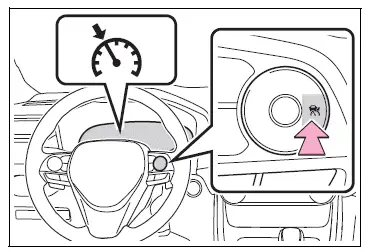
1. With the cruise control off, press and hold the cruise control main switch for 1.5 seconds or more.
Immediately after the switch is pressed, the dynamic radar cruise control indicator will come on. Afterwards, it switches to the cruise control indicator.
Switching to constant speed control mode is only possible when operating the switch with the cruise control off.
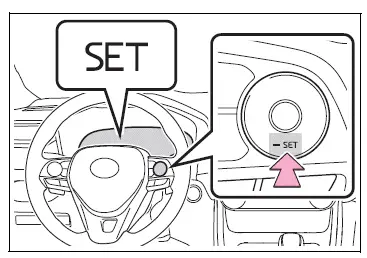
2. Accelerate or decelerate, with accelerator pedal operation, to the desired vehicle speed (at or above approximately 20 mph [30 km/h] ) and press the "-SET" switch to set the speed.
Cruise control "SET" indicator will come on.
The vehicle speed at the moment the switch is released becomes the set speed.
■Dynamic radar cruise control with full-speed range can be set when
- The shift lever is in D.
- The desired set speed can be set when the vehicle speed is approximately 30 km/h or more.
(However, when the vehicle speed is set while driving at below approximately 20 mph [30 km/h], the set speed will be set to approximately 20 mph [30 km/h].)
■Accelerating after setting the vehicle speed
The vehicle can accelerate by operating the accelerator pedal. After accelerating, the set speed resumes. However, during vehicle-to- vehicle distance control mode, the vehicle speed may decrease below the set speed in order to maintain the distance to the preceding vehicle.
■When the vehicle stops while follow-up cruising
- Pressing the "+RES" switch while the vehicle ahead stops will resume follow-up cruising if the vehicle ahead starts off within approximately 3 seconds after the switch is pressed.
- If the vehicle ahead starts off within 3 seconds after your vehicle stops, follow-up cruising will be resumed.
■Automatic cancelation of vehicle- to-vehicle distance control mode
Vehicle-to-vehicle distance control mode is automatically canceled in the following situations.
- VSC is activated.
- TRAC is activated for a period of time.
- When the VSC or TRAC system is turned off.
- The sensor cannot detect correctly because it is covered in some way.
- When the brake control or output restriction control of a driving support system operates.
(For example: Pre-Collision System, Drive-Start Control)
- The parking brake is operated.
- The vehicle is stopped by system control on a steep incline.
- The following are detected when the vehicle has been stopped by system control:
- The driver is not wearing a seat belt.
- The driver's door is opened.
- The vehicle has been stopped for about 3 minutes
If vehicle-to-vehicle distance control mode is automatically canceled for any reasons other than the above, there may be a malfunction in the system. Contact your Toyota dealer.
■Automatic cancelation of constant speed control mode
Constant speed control mode is automatically canceled in the following situations:
- Actual vehicle speed is more than approximately 16 km/h below the set vehicle speed.
- Actual vehicle speed falls below approximately 30 km/h.
- VSC is activated.
- TRAC is activated for a period of time.
- When the VSC or TRAC system is turned off.
- When the brake control or output restriction control of a driving support system operates.
(For example: Pre-Collision System, Drive-Start Control)
- The parking brake is operated.
If constant speed control mode is automatically canceled for any reasons other than the above, there may be a malfunction in the system.
Contact your Toyota dealer.
■Brake operation
A brake operation sound may be heard and the brake pedal response may change, but these are not malfunctions.
■Warning messages and buzzers for dynamic radar cruise control with full-speed range
Warning messages and buzzers are used to indicate a system malfunction or to inform the driver of the need for caution while driving. If a warning message is shown on the multi-information display, read the message and follow the instructions.
■When the sensor may not be correctly detecting the vehicle ahead
In the case of the following and depending on the conditions, operate the brake pedal when deceleration of the system is insufficient or operate the accelerator pedal when acceleration is required.
As the sensor may not be able to correctly detect these types of vehicles, the approach warning may not be activated.
- Vehicles that cut in suddenly
- Vehicles traveling at low speeds
- Vehicles that are not moving in the same lane
- Vehicles with small rear ends (trailers with no load on board, etc.)

- Motorcycles traveling in the same lane
- When water or snow thrown up by the surrounding vehicles hinders the detecting of the sensor
- When your vehicle is pointing upwards (caused by a heavy load in the luggage compartment, etc.)
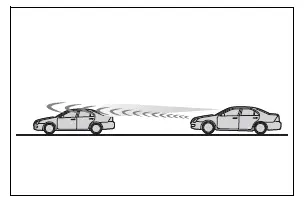
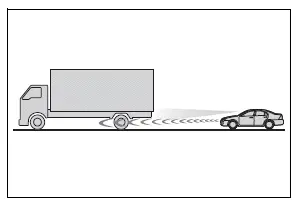
- Preceding vehicle has an extremely high ground clearance
■Conditions under which the vehicle-to-vehicle distance control mode may not function correctly
In the case of the following conditions, operate the brake pedal (or accelerator pedal, depending on the situation) as necessary.
As the sensor may not be able to correctly detect vehicles ahead, the system may not operate properly.
- When the road curves or when the lanes are narrow
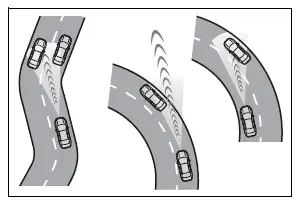
- When steering wheel operation or your position in the lane is unstable
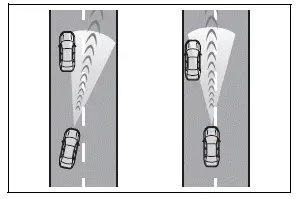
- When the vehicle ahead of you decelerates suddenly
- When driving on a road surrounded by a structure, such as in a tunnel or on a bridge
- While the vehicle speed is decreasing to the set speed after the vehicle accelerates by depressing the accelerator pedal
Test yourself
A quick Toyota RAV4 quiz: every answer comes with an explanation and a link to the manual page.