The Blind Spot Monitor is a system that has 2 functions;
The Blind Spot Monitor function Assists the driver in making the decision when changing lanes
The Rear Cross Traffic Alert function Assists the driver when backing up
These functions use same sensors.
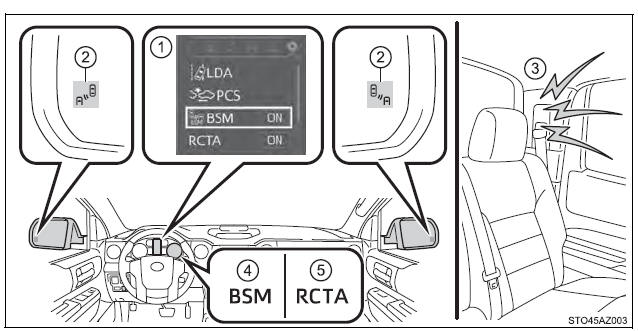
Multi-information display Turning the BSM function/RCTA function on/off.
Outside rear view mirror indicators Blind Spot Monitor function: When a vehicle is detected in a blind spot of the outside rear view mirrors or approaching rapidly from behind into a blind spot, the outside rear view mirror indicator on the detected side will illuminate. If the turn signal lever is operated toward the detected side, the outside rear view mirror indicator will flash.
Rear Cross Traffic Alert function: When a vehicle approaching from the right or left at the rear of the vehicle is detected, both outside rear view mirror indicators will flash.
Rear Cross Traffic Alert buzzer (Rear Cross Traffic Alert function only) When a vehicle approaching from the right or left rear of the vehicle is detected, a buzzer sounds from behind the left-hand rear pillar.
"BSM" indicator When the BSM function is turned on, the indicator illuminates.
"RCTA" indicator When the RCTA function is turned on, the indicator illuminates.
Turning the BSM function/RCTA function on/off
The BSM (Blind Spot Monitor) function and RCTA (Rear Cross Traffic Alert) function can be enabled/disabled on the multi-information display as following:
1. Press "" or "" of meter control switches and select .
2. Press "" or "" of meter control switches and select "BSM" or "RCTA", and press to select the desired setting (on/off).
Changing the BSM indicator brightness
The BSM (Blind Spot Monitor) outside rear view mirror indicators brightness can be changed on the multi-information display as following:
1. Press "" or "" of meter control switches and select .
2. Press "" or "" of meter control switches and select "Vehicle Settings", and then press .
3. Press "" or "" of meter control switches and select "BSM Brightness", and then press to select the desired setting (bright/dim).
Changing the Rear Cross Traffic Alert warning buzzer volume
1. Press "" or "" of meter control switches and select .
2. Press "" or "" of meter control switches and select "Vehicle Settings", and then press .
3. Press "" or "" of meter control switches and select "RCTA Volume", and then press to select the desired setting.
The buzzer volume changes with each press .
■The outside rear view mirror indicators visibility When under strong sunlight, the outside rear view mirror indicator may be difficult to see.
■Rear Cross Traffic Alert buzzer hearing Rear Cross Traffic Alert function may be difficult to hear over noises such as high audio volume.
■When there is a malfunction in the Blind Spot Monitor system If a system malfunction is detected due to any of the following reasons, warning messages will be displayed
There is a malfunction with the sensors
The sensors have become dirty
The outside temperature is extremely high or low
The sensor voltage has become abnormal
■Certification for the Blind Spot Monitor system
For vehicles sold in the U.S.A.
FCC ID: OAYSRR3A
This device complies with part 15 of the FCC Rules. Operation is subject to the following three conditions:
(1) This device may not cause harmful interference, and (2) this device must accept any interference received, including interference that may cause undesired operation.
FCC Warning
Changes or modifications not expressly approved by the party responsible for compliance could void the user's authority to operate the equipment.
For vehicles sold in Canada
Applicable law: Canada 310
This device complies with Industry Canada licence-exempt RSS standard(s).
Operation is subject to the following two conditions: (1) this device may not cause interference, and (2) this device must accept any interference, including interference that may cause undesired operation of the device.
Frequency bands: 24.05 - 24.25 GHz Output power: less than 20 milliwatts
WARNING
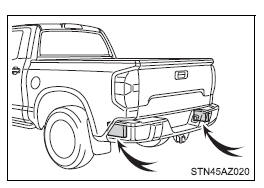
■Handling the radar sensor One Blind Spot Monitor sensor installed inside the left and right side of the vehicle rear bumper respectively. Observe the following to ensure the Blind Spot Monitor system can function correctly.
Keep the sensor and its surrounding area on the bumper clean at all times.
Do not subject the sensor or surrounding area on the bumper to a strong impact. If the sensor moves even slightly off position, the system may malfunction and vehicles that enter the detection area may not be detected. If the sensor or surrounding area is subject to a strong impact, always have the area inspected by your Toyota dealer.
Do not disassemble the sensor.
Do not attach accessories or stickers to the sensor or surrounding area on the bumper.
Do not modify the sensor or surrounding area on the bumper.
Do not paint the rear bumper any color other than an official Toyota color.
The Blind Spot Monitor function
The Blind Spot Monitor function uses radar sensors to detect vehicles that are traveling in an adjacent lane in the area that is not reflected in the outside rear view mirror (the blind spot), and advises the driver of the vehicles existence via the outside rear view mirror indicator.
The Blind Spot Monitor function detection areas
The areas that vehicles can be detected in are outlined below.
The range of the detection area extends to:
Approximately 11.5 ft. (3.5 m) from the side of the vehicle The first 1.6 ft. (0.5 m) from the side of the vehicle is not in the detection area
Approximately 9.8 ft. (3 m) from the rear bumper
Approximately 3.3 ft. (1 m) forward of the rear bumper
WARNING
■Cautions regarding the use of the system The driver is solely responsible for safe driving. Always drive safely, taking care to observe your surroundings.
The Blind Spot Monitor function is a supplementary function which alerts the driver that a vehicle is present in the blind spot. Do not overly rely on the Blind Spot Monitor function. The function cannot judge if it is safe to change lanes, therefore over reliance could cause an accident resulting in death or serious injury.
According to conditions, the system may not function correctly. Therefore the driver's own visual confirmation of safety is necessary.
■The Blind Spot Monitor function is operational when
The BSM function is set to on.
Vehicle speed is greater than approximately 40 km/h.
■The Blind Spot Monitor function will detect a vehicle when
A vehicle in an adjacent lane overtakes the vehicle.
Another vehicle enters the detection area when it changes lanes.
You overtake a vehicle in adjacent lane.
■Conditions under which the Blind Spot Monitor function will not detect a vehicle The Blind Spot Monitor function is not designed to detect the following types of vehicles and/or objects:
Small motorcycles, bicycles, pedestrians, etc.*
Vehicles traveling in the opposite direction
Guardrails, walls, signs, parked vehicles and similar stationary objects*
Following vehicles that are in the same lane*
Vehicles driving 2 lanes across from your vehicle*
Vehicles which are being overtaken rapidly by your vehicle.
*: Depending on conditions, detection of a vehicle and/or object may occur
■Conditions under which the Blind Spot Monitor function may not function correctly
The Blind Spot Monitor function may not detect vehicles correctly in the following conditions:
During bad weather such as heavy rain, fog, snow, etc.
When ice or mud, etc., is attached to the rear bumper
When driving on a road surface that is wet due to rain, standing water, etc.
When there is a significant difference in speed between your vehicle and the vehicle that enters the detection area
When a vehicle is in the detection area from a stop and remains in the detection area as your vehicle accelerates
When driving up or down consecutive steep inclines, such as hills, a dip in the road, etc.
When multiple vehicles approach with only a small gap between each vehicle
When vehicle lanes are wide, and the vehicle in the next lane is too far away from your vehicle
When the vehicle that enters the detection area is traveling at about the same speed as your vehicle
When towing anything such as trailer, boat, etc.
When there is a significant difference in height between your vehicle and the vehicle that enters the detection area
Directly after the BSM function is set to on
When towing a trailer
When items such as a bicycle carrier are installed on the rear of the vehicle
Instances of the Blind Spot Monitor function unnecessarily detecting a vehicle and/or object may increase under the following conditions:
When there is only a short distance between your vehicle and a guardrail, wall, etc.
When there is only a short distance between your vehicle and a following vehicle
When vehicle lanes are narrow and a vehicle driving 2 lanes across from your vehicle enters the detection area
When items such as a bicycle carrier are installed on the rear of the vehicle
The Rear Cross Traffic Alert function
The Rear Cross Traffic Alert functions when your vehicle is in reverse.
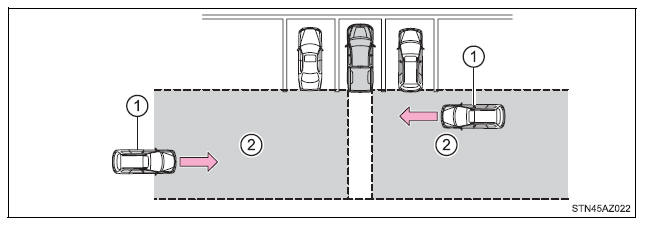
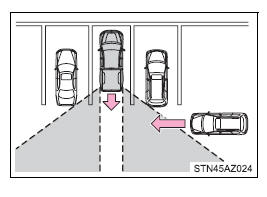
It can detect other vehicles approaching from the right or left rear of the vehicle. It uses radar sensors to alert the driver of the other vehicle's existence through flashing the outside rear view mirror indicators and sounding a buzzer.
Approaching vehicles
Detection areas
WARNING
■Cautions regarding the use of the system The driver is solely responsible for safe driving. Always drive safely, taking care to observe your surroundings.
The Rear Cross Traffic Alert function is only an assist and is not a replacement for careful driving. Driver must be careful when backing up, even when using Rear Cross Traffic Alert function. The driver's own visual confirmation of behind you and your vehicle is necessary and be sure there are no pedestrians, other vehicles, etc., before backing up. Failure to do so could cause death or serious injury.
According to conditions, the system may not function correctly. Therefore the driver's own visual confirmation of safety is necessary.
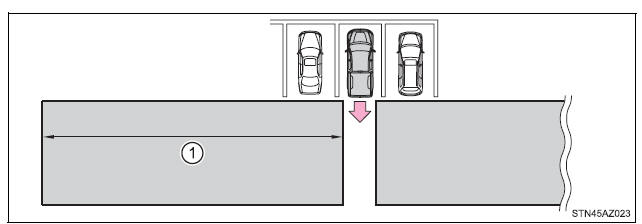
The Rear Cross Traffic Alert function detection areas
The areas that vehicles can be detected in are outlined below.
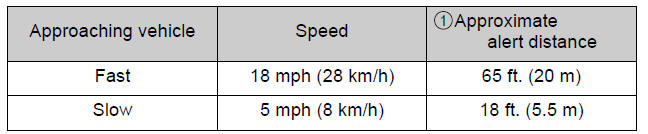
To give the driver a more consistent time to react, the buzzer can alert for faster vehicles from farther away.
Example:
■The Rear Cross Traffic Alert function is operational when
The RCTA function is set to on.
The shift lever is in R.
Vehicle speed is less than approximately 8 km/h.
Approaching vehicle speed is between approximately 8 km/h and 28 km/h.
■Conditions under which the Rear Cross Traffic Alert function will not detect a vehicle The Rear Cross Traffic Alert function is not designed to detect the following types of vehicles and/or objects.
Small motorcycles, bicycles, pedestrians, etc.*
Vehicles approaching from directly behind
Guardrails, walls, signs, parked vehicles and similar stationary objects*
Vehicles moving away from your vehicle
Vehicles approaching from the parking spaces next to your vehicle*
Vehicles backing up in the parking space next to your vehicle*
*: Depending on conditions, detection of a vehicle and/or object may occur.
■Conditions under which the Rear Cross Traffic Alert function may not function correctly The Rear Cross Traffic Alert function may not detect vehicles correctly in the following conditions.
When ice or mud, etc., is attached to the rear bumper
During bad weather such as heavy rain, fog, snow, etc.
When multiple vehicles approach continuously
Shallow angle parking
When a vehicle is approaching at high speed
When parking on a steep incline, such as hills, a dip in the road, etc.
Directly after the RCTA function is set to on
Directly after the engine is started with the RCTA function is on
When towing a trailer
Vehicles that the sensors cannot detect because of obstacles
 " or "
 " of meter control switches and select
 .
 " or "
 " of meter control switches and select "BSM" or "RCTA", and press
 to select the desired setting (on/off).
