Removing and installing switch module in centre console -EX23-/-EX30-
In this manual: Electrical system
~1min read
Special tools and workshop equipment required
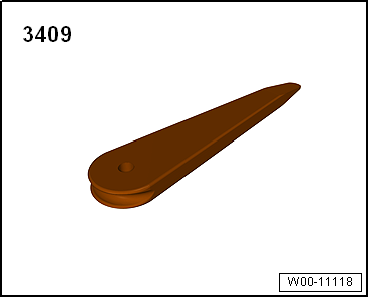
Removal wedge -3409-
Caution
Danger of damage to component surfaces.
When using leverage tools, mask visible areas of the component with commercially available adhesive tape.
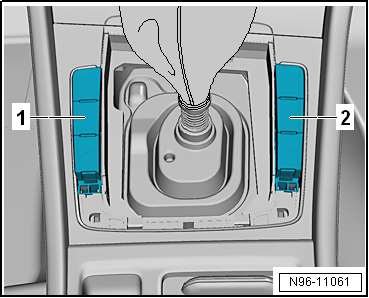
Note On the left and right next to the gear lever, there can be the following buttons in two button modules, depending on the equipment level. The procedure for removal and installation of the button modules is identical for both modules and is therefore described for one of them only. A removed button module cannot be dismantled further. The removal and installation procedures are described for LHD vehicles. Removal and installation for RHD vehicles are similar. Removal and installation are described for the left side. Removal and installation on the right side are carried out in the same way. Depending on vehicle equipment, the following buttons may be installed in the switch module 1 in centre console -EX23-:
TCS and ESP button -E256-
Driving program button -E598-
Start/stop operation button -E693-
Button for driver profile selection -E735-
Depending on vehicle equipment, the following buttons may be installed in the switch module 2 in centre console -EX30-:
Parking aid button -E266-
Park assist steering button -E581-
Removing:
Switch off ignition and all electrical consumers.
Unclip and remove gear lever gaiter upwards from centre console → Rep. gr.34.
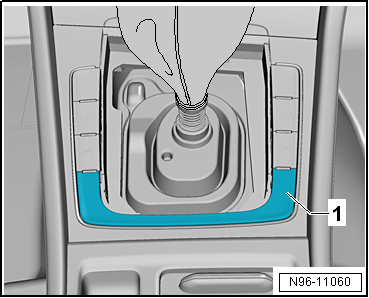
Carefully lever off trim -1- upwards using removal wedge -3409-.
Lift driver side button module -1- or front passenger side button module -2- out of centre console.
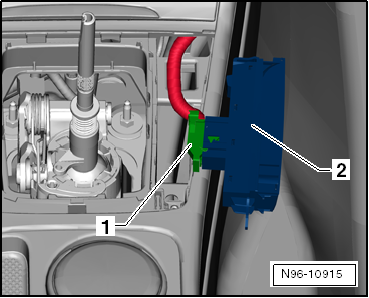
Disconnect connector -1- and remove button module -2-.
Installing
Installation is carried out in reverse order of removal.
Test functionality.
?
Test yourself
A quick Volkswagen Golf quiz: every answer comes with an explanation and a link to the manual page.
 Note On the left and right next to the gear lever, there can be the following buttons in two button modules, depending on the equipment level. The procedure for removal and installation of the button modules is identical for both modules and is therefore described for one of them only. A removed button module cannot be dismantled further. The removal and installation procedures are described for LHD vehicles. Removal and installation for RHD vehicles are similar. Removal and installation are described for the left side. Removal and installation on the right side are carried out in the same way. Depending on vehicle equipment, the following buttons may be installed in the switch module 1 in centre console -EX23-:
 Caution