HD Radio™ Sub-channels
In many cases, a main HD Radio station (FM wavebands only) will also have sub-channels offering additional types of programming or music.
Sub-channels
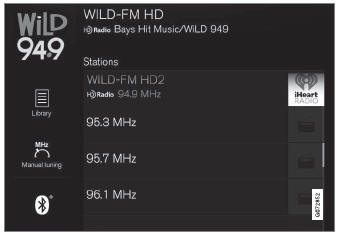
Example of an HD radio station with sub-channels
If any sub-channels are available, they will be listed below the main channel on the screen. In this example, Wild-FM HD2 is a sub-channel.
Selecting sub-channels
To listen to a station's sub-channel(s), tap the station on the screen or press the forward/ back arrow keys on the right-side steering wheel keypad or below the screen.
Sub-channels can also be stored as radio favorites.
If you tap a sub-channel favorite, it may take up to 6 seconds before the channel becomes audible. If you tap a station while you are out of digital range of the transmitter, No reception will be displayed.
Test yourself
A quick Volvo XC90 quiz: every answer comes with an explanation and a link to the manual page.