Audio, media and internet
SiriusXM® Satellite Radio
In this manual: Audio, media and internet
7steps
~42min
2/5difficulty
Done 0 of 7
The SiriusXM® Satellite system broadcasts from of a number of high elevation satellites in geosynchronous orbit.
Listening to Satellite Radio
The digital signals from the satellites are lineof- sight, which means that physical obstructions such as bridges, tunnels, etc, may temporarily interfere with signal reception.
Avoid any obstructions, such as metallic objects transported on roof racks or in a ski box, or other antennas that may impede signals from the SiriusXM® satellites.
Selecting SiriusXM® Satellite Radio
- From the center display's Home view, swipe from right to left to come to App view.

- Tap the SiriusXM® Satellite Radio icon.
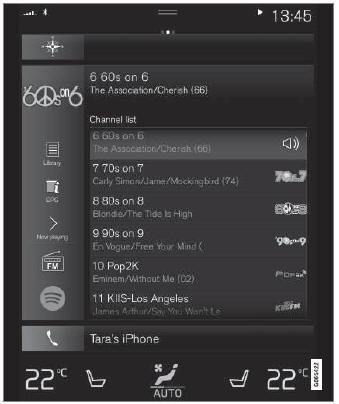
Home View with SiriusXM® Satellite Radio Activated
If there is no subscription activated, tap channel 1, where you will be prompted on the screen to phone SiriusXM®.
If a cell phone is paired and connected to the vehicle, you can also subscribe by:
- From the Home view, pull down the settings menu.
- Open the Settings menu for SiriusXM® Satellite Radio.
- Tap Unsubscribed Services.
- To call SiriusXM®, enter the phone number. They will activate the subscription of your choice. This may take a few minutes.
- When the subscription has been activated, tap the SiriusXM® Satellite radio icon to start the function and display the channel list included in your subscription.
Test yourself
A quick Volvo XC90 quiz: every answer comes with an explanation and a link to the manual page.
Was this page helpful?