Медиаплеер
Обмен Интернетом из автомобиля через Wi-Fi Hotspot (привязка)
Место в руководстве: Медиаплеер
7шагов
~42мин
2/5сложность
Выполнено 0 из 7
When the vehicle is connected to the Internet, other devices may share the vehicle's Internet connection1.
Поставщик сетевых услуг (SIM -карта) должен поддерживать обмен интернетом (привязка).
- Tap Настройки in the Top view.
- Tap Communication
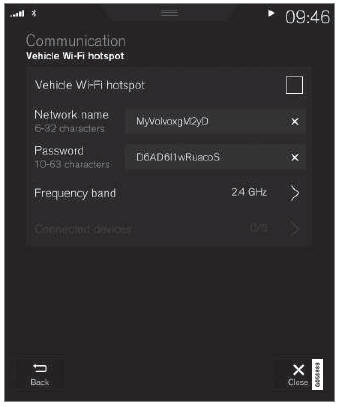
 Vehicle Wi-Fi Hotspot.
- Tap Сеть название to assign a name to the hotspot.
- Tap Пароль and create a password. This password can then be used to connect other devices to this hotspot.
- Tap Частотная полоса and select a frequency for the hotspot to use to transmit data. Please note that selecting a frequency is not possible on all markets.
- Activate/deactivate by tapping to check/ uncheck the Автомобиль Wi-Fi горячей точки box.
- If Wi-Fi is being used to connect to the Internet, confirm the change of connections.
- It is now possible for external devices to connect to the vehicle's Wi-Fi hotspot.
Состояние соединения отображается символом в строке состояния центрального дисплея.
Tap Подключенные устройства to see a list of currently connected devices.
1 This does not apply when the vehicle is connected to the Internet via Wi-Fi.
Проверьте себя
Короткий тест по Volvo XC90: после ответа — пояснение и ссылка на страницу руководства.
Страница помогла?