Медиаплеер
Обрабатывать телефонные звонки
Место в руководстве: Медиаплеер
15шагов
~90мин
4/5сложность
Выполнено 0 из 15
Обрабатывать телефонные звонки в автомобиле для сотового телефона, подключенного к Bluetooth.
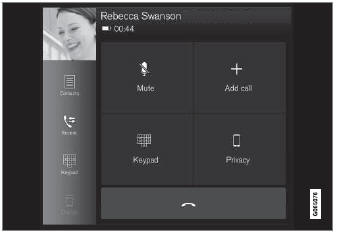
Общая иллюстрация.
Звонит
- Откройте телефонную плитку.
- Initiate a call by selecting the phone number from the recent calls list, entering the number on the keypad or selecting a number from the phone book (list of contacts). You can search or scroll to find a contact in the phone book. Tap
 in the phone book to add a contact to Фавориты.
- Tap
 to make a call.
- Tap
 to end the call.
Calls can also be made from the list of recent calls using the app menu, which can be opened using the  button on the right-side steering wheel keypad.
Делать несколько звонков
Пока звонок идет:
- Tap Добавлять call.
- Выберите из списка недавних вызовов, фаворитов или контактов.
- Tap an item/row in the list of recent calls or
 for the contact in the phone book.
- Tap Обмен звонок to switch between calls.
- Tap
 to end the current call.
Группа (конференция) звонки
В то время как несколько вызовов проводятся:
- Tap Присоединяйтесь к звонкам to merge ongoing calls.
- Tap
 to end the call.
Входящие звонки
Incoming phone calls will be shown on the instrument panel and in the center display. Manage the calls using the right-side steering wheel keypad or the center display.
- Tap Ответ/отклонить.
- Tap
 to end the call.
Входящие звонки, в то время как другой вызов проводится
- Tap Ответ/отклонить.
- Tap
 to end the call.
Конфиденциальность
- While a call is in progress, tap Конфиденциальность and select setting:
- Переключиться на мобильный телефон - the handsfree function will be disabled and the call will proceed on the cellular phone.
- Водитель сосредоточен - the microphone in the ceiling liner on the passenger side will be muted and the call will proceed using the vehicle's hands-free function.
Проверьте себя
Короткий тест по Volvo XC90: после ответа — пояснение и ссылка на страницу руководства.
Страница помогла?