Medien steuern und wechseln
Media playback can be controlled using voice commands, the steering wheel keypad or the center display.
 The media player can be controlled using voice commands, the right-side steering wheel keypad or the center display.
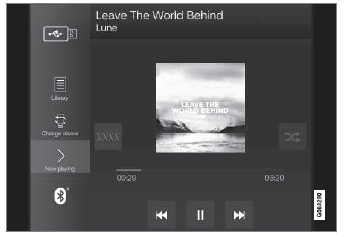
Volume - turn the knob under the center display or tap  on the right-side steering wheel keypad to raise or lower the volume. Play/pause - tap the image for the track you would like to play, or press the button below the center display or
 on the right-side steering wheel keypad.
Changing track/song - tap the desired track in the center display, or press  or
 below the center display or on the right-side steering wheel keypad.
Rewinding/fast-forwarding - tap the time axis in the center display and drag it sideways, or press and hold  or
 below the center display or on the right-side steering wheel keypad.
Changing media source - select from among previous sources in the app, tap the desired app in App view or use the right-side steering wheel keypad to select the app in the app menu  .
 Bibliothek – Tippen Sie auf die Schaltfläche, um von der Bibliothek abzuspielen.
 Zufallswiedergabe – Tippen Sie auf die Schaltfläche, um Titel in zufälliger Reihenfolge abzuspielen.
 Ähnlich – Tippen Sie auf die Schaltfläche, um mit Gracenote nach ähnlicher Musik auf dem USB-Gerät zu suchen und aus der gefundenen Musik eine Wiedergabeliste zu erstellen. Die Wiedergabeliste kann bis zu 50 Titel enthalten.
 Gerät wechseln – Tippen Sie auf die Schaltfläche, um zwischen USB-Geräten zu wechseln, wenn mehr als eines angeschlossen ist.
Testen Sie sich
Ein kurzes Quiz zum Volvo XC90: Zu jeder Antwort gibt es eine Erklärung und einen Link zur Handbuchseite.