Controlling and Changing Media
Media playback can be controlled using voice commands, the steering wheel keypad or the center display.
 The media player can be controlled using voice commands, the right-side steering wheel keypad or the center display.
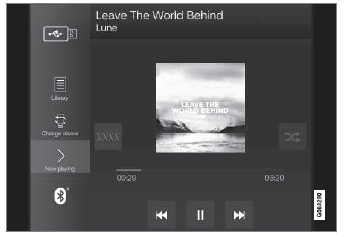
Volume - turn the knob under the center display or tap  on the right-side steering wheel keypad to raise or lower the volume. Play/pause - tap the image for the track you would like to play, or press the button below the center display or
 on the right-side steering wheel keypad.
Changing track/song - tap the desired track in the center display, or press  or
 below the center display or on the right-side steering wheel keypad.
Rewinding/fast-forwarding - tap the time axis in the center display and drag it sideways, or press and hold  or
 below the center display or on the right-side steering wheel keypad.
Changing media source - select from among previous sources in the app, tap the desired app in App view or use the right-side steering wheel keypad to select the app in the app menu  .
 Library - tap the button to play from the library.
 Shuffle - tap the button to play tracks in random order.
 Similar - tap the button to use Gracenote to search for similar music on the USB device and create a playlist from the music found. The playlist can contain up to 50 tracks.
 Change device - tap the button to toggle between USB devices when more than one is connected.
Test yourself
A quick Volvo XC90 quiz: every answer comes with an explanation and a link to the manual page.