Commande et changement de média
Media playback can be controlled using voice commands, the steering wheel keypad or the center display.
 The media player can be controlled using voice commands, the right-side steering wheel keypad or the center display.
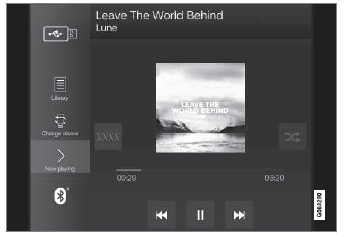
Volume - turn the knob under the center display or tap  on the right-side steering wheel keypad to raise or lower the volume. Play/pause - tap the image for the track you would like to play, or press the button below the center display or
 on the right-side steering wheel keypad.
Changing track/song - tap the desired track in the center display, or press  or
 below the center display or on the right-side steering wheel keypad.
Rewinding/fast-forwarding - tap the time axis in the center display and drag it sideways, or press and hold  or
 below the center display or on the right-side steering wheel keypad.
Changing media source - select from among previous sources in the app, tap the desired app in App view or use the right-side steering wheel keypad to select the app in the app menu  .
 Bibliothèque : appuyez sur ce bouton pour lire depuis la bibliothèque.
 Lecture aléatoire : appuyez sur ce bouton pour lire les pistes dans un ordre aléatoire.
 Similaire : appuyez sur ce bouton pour utiliser Gracenote afin de rechercher de la musique similaire sur le périphérique USB et créer une liste de lecture à partir des morceaux trouvés. La liste de lecture peut contenir jusqu'à 50 pistes.
 Changer d'appareil : appuyez sur ce bouton pour basculer entre les périphériques USB lorsque plusieurs sont connectés.
Testez-vous
Un quiz rapide sur Volvo XC90 : chaque réponse est expliquée, avec un lien vers la page du manuel.