Controllo e modifica del supporto
Media playback can be controlled using voice commands, the steering wheel keypad or the center display.
 The media player can be controlled using voice commands, the right-side steering wheel keypad or the center display.
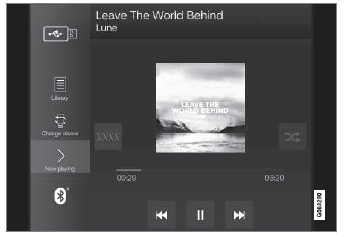
Volume - turn the knob under the center display or tap  on the right-side steering wheel keypad to raise or lower the volume. Play/pause - tap the image for the track you would like to play, or press the button below the center display or
 on the right-side steering wheel keypad.
Changing track/song - tap the desired track in the center display, or press  or
 below the center display or on the right-side steering wheel keypad.
Rewinding/fast-forwarding - tap the time axis in the center display and drag it sideways, or press and hold  or
 below the center display or on the right-side steering wheel keypad.
Changing media source - select from among previous sources in the app, tap the desired app in App view or use the right-side steering wheel keypad to select the app in the app menu  .
 Libreria - toccare il pulsante per riprodurre dalla libreria.
 Casuale - toccare il pulsante per riprodurre i brani in ordine casuale.
 Simili - toccare il pulsante per utilizzare Gracenote per cercare brani simili sul dispositivo USB e creare una playlist con i brani trovati. La playlist può contenere fino a 50 brani.
 Cambia dispositivo - toccare il pulsante per passare da un dispositivo USB all'altro quando ne è collegato più di uno.
Mettiti alla prova
Un breve quiz sulla Volvo XC90: ogni risposta ha una spiegazione e un link alla pagina del manuale.