Listening to a CD
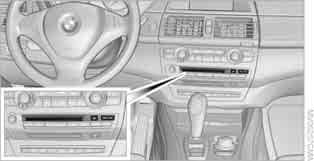
For vehicles equipped with two CD players:
The upper unit is designed for audio CDs.
Compressed audio files
The CD player and CD changer can play CDs with MP3 recordings.
Switching on the CD player
Inserting a CD
Insert the CD label side up.
The disc is drawn in automatically.
If the unit is switched on, playback starts automatically. Reading the contents of a CD with compressed audio files may take up to 1 minute, depending on the file structure.
Via iDrive
To start playback when a CD is already inserted:
For principles of iDrive operation, refer to.
1. Press the button .
The main menu opens.
2. Push the controller back to open the "Entertainment" menu.
3. Move to the upper field. Select "CD" and press the controller.
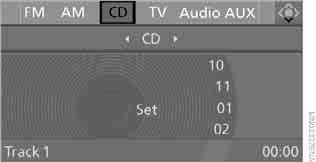
4. Move to the second field from the top. On vehicles with a CD changer, switch on the player by selecting "CD" and pressing the controller.
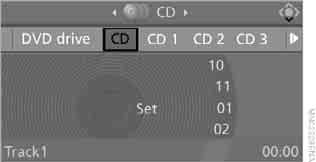
If the unit is switched on, playback starts automatically.
Using direct select buttons
Switching on the CD changer
Via iDrive
1. Press the button .
The main menu opens.
2. Push the controller back to open the "Entertainment" menu.
3. Move to the upper field. Select "CD" and press the controller.
4. Move to the second field from the top.
Select a CD and press the controller.
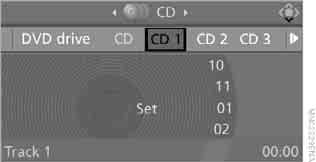
When playback of one disc ends, playback of the next disc begins.
Using direct select buttons
Individual CD changer slots can be programmed to the direct-select keys so that they can be used to switch on the unit.
Test yourself
A quick BMW X3 quiz: every answer comes with an explanation and a link to the manual page.