CD changer
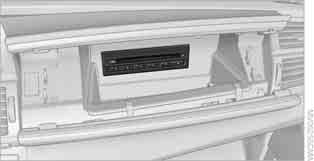
The BMW six-CD changer is located in the glove compartment.
Controls and indicators
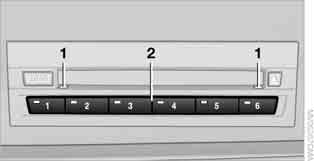
1 LEDs next to the CD slot: flashing indicates that a CD can be inserted into the slot.
2 CD compartment buttons: the LED in the button lights when the compartment is occupied.
Loading CDs into the CD changer
1. Press the button .
The LED in the button of the first free compartment starts flashing.
2. If desired, select a different compartment:
press the button ...
 .
3. When the LEDs 1 next to the CD slot start flashing, insert a CD into the slot.
It is automatically drawn in and placed into the selected compartment.
 Insert the disc only when LEDs 1 are flashing, otherwise there is a risk of damaging the disc or the CD changer.
Do not push the disc, otherwise it may become jammed in the slot. ◄ 4. To load discs into other compartments, repeat steps 1 to 3.
Loading discs into free compartments
1. Press and hold the button .
The LEDs of the free compartments start flashing.
2. When the LEDs 1 next to the CD slot start flashing, insert a CD into the slot.
It is automatically drawn in and placed into the first free compartment.
Insert the disc only when LEDs 1 are flashing, otherwise there is a risk of damaging the disc or the CD changer.
Do not push the disc, otherwise it may become jammed in the slot. ◄ 3. Wait until the disc has been drawn in.
4. To load discs into other compartments, repeat steps 2 to 3.
Removing CDs from the CD changer
1. Press the button .
2. Press the button. ..
 of the corresponding compartment.
The CD is ejected from the CD changer.
3. Remove the disc.
Removing all CDs from the CD changer
1. Press and hold the button.
The CDs are ejected from the CD changer one by one.
2. Remove the discs.
Test yourself
A quick BMW X3 quiz: every answer comes with an explanation and a link to the manual page.