General
PREAMBLE
Opening management includes locking / unlocking of the front doors, rear doors and tailgate.
Control devices
The control devices for locking / unlocking are as follows:
- a disengageable lock on the driver's door (two locks in right-hand drive),
- the ignition key,
- the remote control,
- a central locking button on the dashboard,
- an electric external tailgate opening button,
- an electric internal tailgate opening button (depending on equipment),
- unlocking by interior opening control on all 4 doors,
- deactivation of the rear door interior opening control by a rotary button on the door edge (child safety).
Display device:
The locking / unlocking indicators are as follows:
- a red indicator lamp on the central locking button,
- the direction indicators,
- a child lock indicator on the instrument cluster (depending on version). The indicator comes on for 15 seconds each time +ACC is switched on,
- a message on the multifunction display when the engine starts, if the information is not available on the instrument cluster,
- a visual indication of the child lock status on the door panel.
Note: The indicator on the instrument cluster or the message on the multifunction display only appears if both rear doors are in the "Child lock" state.
Note: Pressing the central locking button reactivates the indicator or the message on the multifunction display.
DEFINITION OF DOOR STATES
STATUS |
DEFINITION |
| Unlocked | The doors can be opened from both outside and inside the vehicle |
| Locked | The doors cannot be opened from outside the vehicle |
| Super-locked | The doors cannot be opened from either outside or inside the vehicle |
| Door closed | Door closed at the 2nd latch position |
| Rebound | Immediate unlocking after a locking command |
| "Child lock" | Immediate unlocking after a locking command |
DIAGRAM
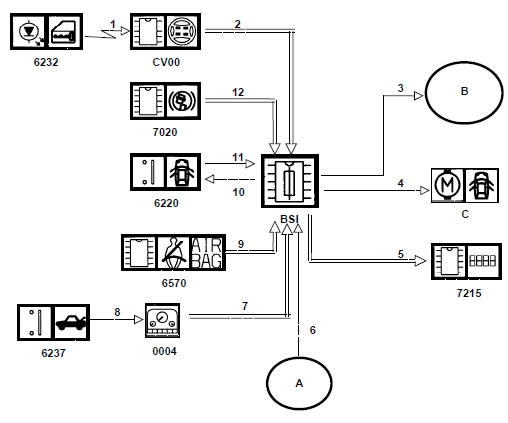
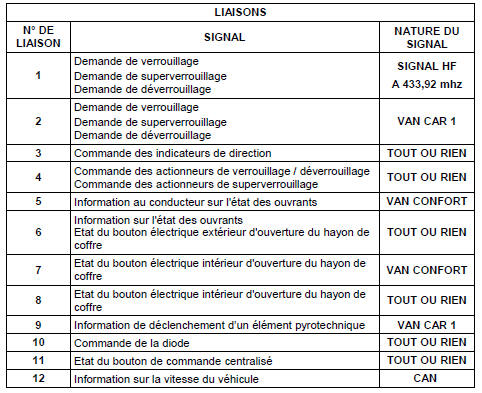
Door management
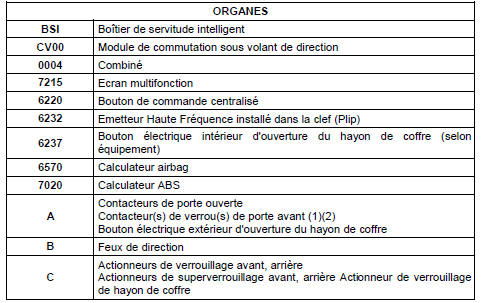
(1) Left side for left-hand drive vehicles. (2) Right and left side for right-hand drive vehicles.
HIGH-FREQUENCY REMOTE CONTROL
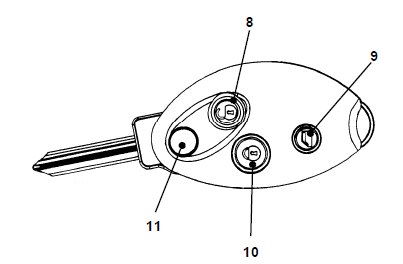
High-frequency remote control

Remote control operating conditions
The remote control functions are activated:
CONDITION |
| If the key is not inserted in the steering lock |
| Or if the key is in the steering lock in the OFF position, 1 minute after the driver's door is opened |
| Or if the key is in the steering lock in the OFF position, 1 minute after the key is returned from the +ACC position to the OFF position |
Functions performed
The remote control can activate the following functions:
| FUNCTION | DESIGNATION | PERFORMANCE |
| Unlatching | See description of door states | Range 10 m |
| Latching | Range 10 m | |
| Super-locking | Range 10 m | |
| Location | Direction indicators flash and interior lighting comes on for 10 seconds | Range 30 m |
| Window and sunroof management | Full closing of the sunroof Full or partial closing of the windows |
Range 10 m |
Note: An indicator lamp and a message on the instrument cluster warn the user that the battery is wearing out when performance has dropped by approximately 30%.
Pairing with the vehicle
Using the remote control requires pairing with the vehicle.
The coded message sent to the receiver by each remote control is made up of the following codes:
- a fixed code linked to the key,
- a rolling code paired with the vehicle receiver,
- a code corresponding to the action to be performed,
- a code corresponding to the battery charge state.
Resynchronising the remote control
The rolling code of the remote control changes each time the remote control is used.
A difference between the rolling code expected by the receiver and the one sent by the remote control is tolerated (when the remote control is used outside the receiver's range).
If the tolerance is exceeded, the remote control must be resynchronised.
The tolerance is 255 offsets.
To resynchronise the remote control, proceed as follows:
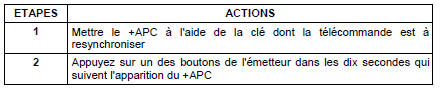
Note: For a vehicle equipped with the underinflation function, the vehicle must remain at zero speed during the resynchronisation procedure.
Test yourself
A quick Citroen C5 Aircross quiz: every answer comes with an explanation and a link to the manual page.