Driving checks
Black panel (comfort night display)
In this manual: Driving checks
~1min read
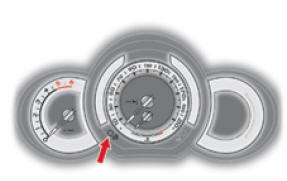
When driving at night, this function allows some of the information shown in the instrument panel to be switched off in order to reduce driver eye strain.
Essential information, such as vehicle speed, warning lamps, speed limiter or cruise control information, remains displayed in the instrument panel.
Arming
- With the lights on, press the left instrument panel button repeatedly to gradually reduce the brightness of the driver's area lighting.
- Press again to reduce the brightness to the minimum and switch off the ambient lighting.
- Press again to activate black panel mode.
Test yourself
A quick Citroen DS3 quiz: every answer comes with an explanation and a link to the manual page.
Was this page helpful?