Destination selection
To a new destination
 Press Navigation to
display the home page.
 Press the subpage
 Select "Enter destination".
 Select "Address".
 Select "Country:"
from the list, then in the same way "City" or its postal code, "Street", "No.".
Confirm each time.
 Select "Archive" to
save the address in contacts.
The system can store up to 200 entries.
 Select "Route to".
 Select the navigation criterion:
"Fastest", "Shortest", "Time/distance" or "Eco".
 Select the avoidance criteria:
"Toll", "Ferries", "Road works", "Exact", "Close".
 Select "Confirm".
or
Press "View route on map" to start route guidance.
To clear route guidance information, press "Settings".
Press "Stop guidance".
To resume route guidance, press "Settings".
Press "Resume guidance".
To one of the last destinations
 Press Navigation to
display the home page.
 Press the subpage.
 Select " Enter destination ".
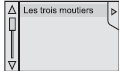 Select an address from the list.
 Select "Route to".
 Select the criteria, then
"Confirm", or press "Show route on map" to start guidance.
To a contact from the address book
To navigate "to a contact from the phone book", you must first enter the address of that contact. Press Navigation to
display the home page.
 Press the subpage.
 Select " Enter destination ".
 Select " Contacts ".
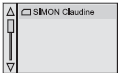 Select the destination from the
list of contacts.
 Select "Route to".
 Select the criteria, then
" Confirm " to start guidance.
To GPS coordinates
 Press Navigation to
display the home page.
 Press the subpage.
 Select " Enter destination ".
 Select "Address".
 Set "Longitude",
then "Latitude".
 Select "Route to".
 Select the criteria, then
" Confirm ", or press "Show route on map" to start guidance.
To a point on the map
 Press Navigation to
display the home page.
 Press the subpage.
 Select " Enter destination ".
 Select " On map ".
Zoom in on the map and select the entered point (or points).
Press and hold to display related information.
To points of interest (POI)
POI are stored by category.
 Press "Navigation" to
display the home page.
 Press the subpage.
 Select " Search POI ".
 Select " All POI ",
or
 " Car ",
or
 "Restaurants/hotels".
The annual map update provides information about new POIs. A monthly update of "Danger zones" is also possible. The detailed procedure is available at
Test yourself
A quick Citroen DS3 quiz: every answer comes with an explanation and a link to the manual page.