Audio and telematics
Selecting a radio station
In this manual: Audio and telematics
~1min read
 Press Radio Media to
display the home page.
 Select " List " on the
home page.
or
 Press Radio Media to
display the home page.
 Press the subpage.
 Select " Radio station list " on the
subpage.
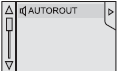 Select a radio station
from the suggested list.
 Select "Update list" to
refresh the list contents.
To select a stored radio station.
 Press Radio Media to
display the home page.
 Select " Store ".
 Select a radio station from the list.
 If necessary, select
a different source.
 Select " FM radio ".
or
 " AM radio ".
Radio reception may be disturbed by the use of electrical devices not approved by CITROËN, e.g. a USB charger connected to a 12 V socket. The external environment (hill, building, tunnel, car park, underground...) may block reception, including in RDS tracking mode. This phenomenon is normal for radio wave propagation and in no way indicates a fault with the radio.
Test yourself
A quick Citroen DS3 quiz: every answer comes with an explanation and a link to the manual page.
Was this page helpful?