Adaptive Cruise Control Set Speed Adjustment
Drive at the speed you prefer.

 Press the up or down toggle switch to set the current speed.
Take your foot off the accelerator pedal.
The information display shows the indicator, the current gap setting and the set speed.
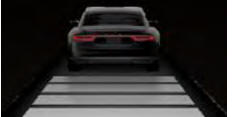
The vehicle image illuminates if a vehicle is detected ahead of you.
Adaptive Cruise Control Set Speed Adjustment After a Complete Stop

 Press the up or down toggle switch with the brake pedal fully depressed.
The set speed is adjustable to 30 km/h.
The information display shows the indicator, the current gap setting and the set speed.
Manually Changing the Set Speed
 Press and release the up switch to gradually increase the set speed.
Press and hold the up toggle switch to increase the set speed in large increments. Release the switch when the desired speed is reached.
 Press and release the SET- button to gradually decrease the set speed.
Press and hold the down toggle switch to decrease the set speed in large increments. Release the switch when the desired speed is reached.
Press the accelerator or brake pedal until the desired speed is reached. Press the up or down toggle switch to set the current speed as the set speed.
The system may apply the brakes to slow the vehicle to the new set speed. The set speed is continuously displayed on the information display when the system is active.
Test yourself
A quick Ford Explorer quiz: every answer comes with an explanation and a link to the manual page.