Locking and unlocking
Note: Do not leave the keys in the vehicle.
Locking
Locking with the key
Turn the top of the key towards the front of the vehicle.
Locking with the remote control
Note: The driver's door can be locked with the key. Use it when the remote control does not work.
 Press the button.
Double locking of the doors
WARNING
Do not activate double locking when people or animals are in the vehicle.
If the doors have been double locked, they cannot be unlocked from the inside.
Double locking is an anti-theft feature that prevents the doors from being opened from the inside. Double locking can only be activated when all the doors are closed.
Double locking with the key
Turn the key to the locking position twice within three seconds.
Double locking with the remote control
 Press the button twice within
three seconds.
Unlocking
Unlocking with the key
Turn the top of the key towards the rear of the vehicle.
Unlocking with the remote control
Note: The driver's door can be unlocked with the key. Use it when the remote control does not work.
Note: If the vehicle remains locked for several weeks, the remote control will be deactivated. Unlock the vehicle and start the engine with the key. Unlocking and starting the vehicle once will reactivate the remote control.
 Press the button.
Automatic locking
The doors will be locked automatically again if no door is opened within 45 seconds of remote unlocking. The door locks and alarm system will return to their previous state.
Changing the unlocking function programme
The unlocking function can be reprogrammed so that only the driver's door is unlocked (see Programming the remote control (page 32)).
Confirmation of locking and unlocking
Note: If your vehicle is fitted with double locking, the indicators will flash twice only when you activate double locking.
When you lock the doors, the indicators flash twice.
When you unlock the doors, the indicators flash once.
Locking and unlocking the doors from the inside
 Press the button.
Location of individual components.
See Quick start (page 10).
Tailgate
Manual opening
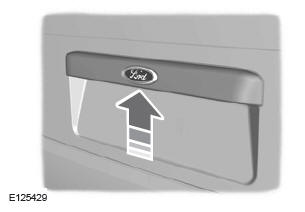
To open the tailgate, press the button.
The driver's door must be unlocked.
Opening with the remote control
 Press the button twice within
three seconds.
Closing the tailgate
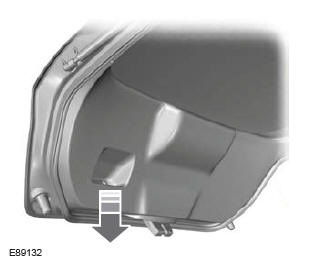
The handles (recesses) on the inside of the tailgate are used to lower and close it.
Locking individual doors with the key
Note: If the central locking system does not work, individual doors can be locked with the key at the location shown.
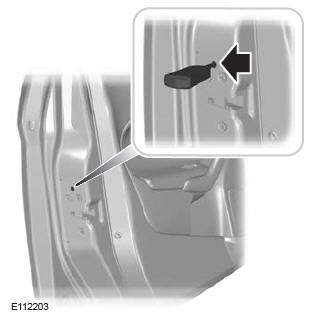
Left-hand side
Turn clockwise to lock.
Right-hand side
Turn counterclockwise to lock.
Unlocking
Note: If the child safety locks have also been activated, pulling the inside handle will only release the emergency locking, but not the child safety lock.
The door can only be opened using the outside door handle.
Note: If the doors have been unlocked using this method, lock the doors individually until the central locking system has been repaired.
Unlock the driver's door with the key.
The other doors can be unlocked individually by pulling the inside door handle on the respective door.
Test yourself
A quick Ford Fiesta quiz: every answer comes with an explanation and a link to the manual page.