Power Windows
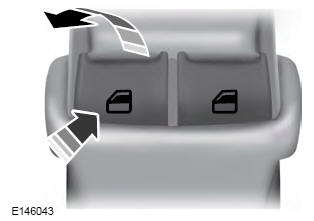
Press the switch to open the window.
Pull up on the switch to close the window.
One-Touch Down
Press the switch fully and release it. Press again or pull up on it to stop the window.
One-Touch Up
Pull the switch fully up and release it. Press again or pull up on it to stop the window.
Resetting the One-Touch Feature
Start the engine.
- Pull and hold the window switch until the door window is fully closed. Continue holding the switch for several seconds after the window closes.
- Release the window switch.
- Press and hold the window switch until the window is fully open.
- Release the window switch.
- Pull up and hold the window switch until the window is fully closed.
- Check that the window operates correctly using the One-Touch Down and One-Touch Up functions.
Auto-Reverse
The window stops automatically when closing. It reverses a short distance if an obstacle is in the way.
Overriding the Auto-Reverse Feature
Pull up the window switch and hold it for a few seconds after the window reaches the closed position. The window travels without bounce-back protection. The window stops if you release the switch before the window is fully closed.
Window Lockout
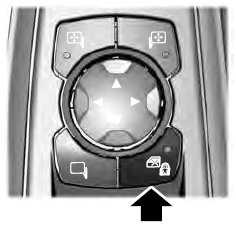
Press the control to lock or unlock the rear window controls. The indicator light illuminates when you lock the rear window controls.
Accessory Delay
You can use the window switches for up to several minutes after switching the ignition off, or until you open either of the front doors.
Test yourself
A quick Ford Fusion quiz: every answer comes with an explanation and a link to the manual page.