Satellite Radio (IF EQUIPPED)
SiriusXM® Satellite Radio broadcasts a variety of music, news, sports, weather, traffic, and entertainment satellite radio channels. For more information and a complete list of SiriusXM satellite radio channels, visit www.siriusxm.com in the U.S., www.siriusxm.ca in Canada, or call SiriusXM at 1-888-539-7474.
Satellite Radio Reception Factors
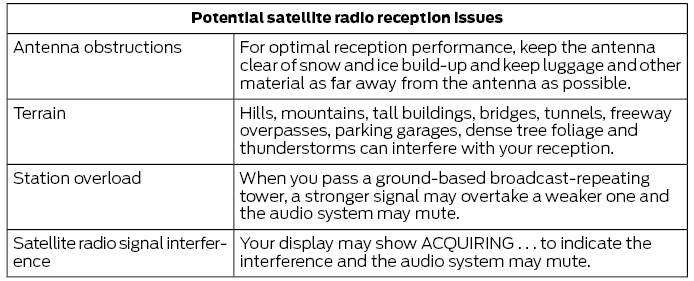
SiriusXM Satellite Radio Service
Note: SiriusXM reserves the right to change, reorder, add, or remove programming at any time, including cancelling, moving, or adding certain channels and their prices, with or without notice to you. Ford Motor Company is not responsible for any such programming changes.

SiriusXM Satellite Radio is a subscription-based satellite radio service that broadcasts a variety of music, sports, news, weather, traffic, and entertainment programming. Your factory-installed SiriusXM Satellite Radio system includes equipment and a limited subscription period that begins on the date your vehicle is sold or leased. Contact an authorized dealer for availability.
For more information on extended subscription terms (a service fee is required), the online media player, a complete list of SiriusXM satellite radio channels, and other features, visit www.siriusxm.com in the U.S., www.siriusxm.ca in Canada, or call SiriusXM at 1-888-539-7474.
Satellite Radio Electronic Serial Number (ESN)
You need the ESN to activate, change, or track your satellite radio account.
How to Find Your ESN
When using satellite radio as a source, use the touchscreen to select the following:
- Select Settings . Refer to Settings.
- Select SiriusXM.
- Select SiriusXM information.
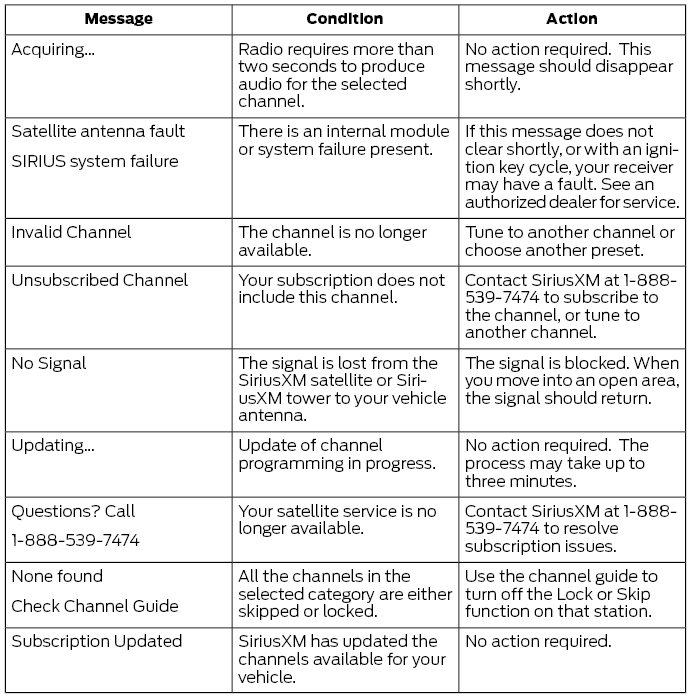
Troubleshooting
Test yourself
A quick Ford Fusion quiz: every answer comes with an explanation and a link to the manual page.