Lane Keeping Aid
Switching the system on and off
Note: The system does not switch on automatically each time you switch the ignition on. Note: When you switch the system on, the Lane Departure Warning is switched on automatically.
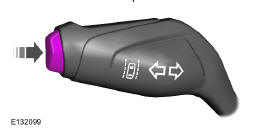
To switch the system on and off, use the button on the turn signal lever.
Press the button three times to switch the system on. Press the button again to switch the system off.
Adjusting System Sensitivity
You can adjust the intervention timing of the system in a dangerous situation.
The system has two sensitivity levels that you can select using the information display. See General Information
System warnings
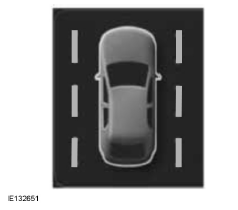
A column of lane markings is displayed on each side of the vehicle icon.
Lane markings follow the color coding below:
- Green: the system is ready to warn you of an unintentional lane change.
- Yellow: the system automatically applies steering torque to align the vehicle's path and correct any unintentional lane drift.
- Red: your vehicle is approaching or is too close to the detected lane boundary. The steering wheel gives a vibration warning. Take immediate action to safely steer the vehicle back into its lane.
Situations that may cause a lane boundary to be removed:
- The road markings are not detected by the sensor.
- You activate the turn signal for that side of the vehicle.
- If you perform sudden maneuvers, accelerate hard or brake hard.
- Your vehicle speed is outside the operating limits.
- When the anti-lock braking system or electronic stability control intervenes.
- Narrow lane.
Note: You can override the system at any time while it is operating by turning the steering wheel.
Test yourself
A quick Ford Mondeo quiz: every answer comes with an explanation and a link to the manual page.