Memory Function
WARNINGS
- Before activating the seat memory, make sure there is no obstruction in the immediate vicinity of the seat and that all occupants are clear of moving parts.
- Do not use the memory function while the vehicle is moving.
This function automatically recalls the driver's seat position, the power mirrors and the power steering column position. The memory switch is located on the driver's door.
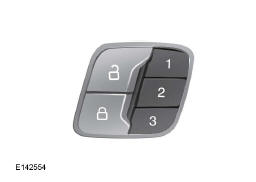
Storing a Preset Position
- Switch on the ignition.
- Adjust the seat, outside mirrors and steering column to the desired position.
- Press and hold the desired preset button until you hear an audible signal.
You can store up to three memory preset positions. You can store a memory preset at any time.
Recalling a Preset Position
Press the preset button corresponding to the desired driving position, then release it. The seat, mirrors and steering column move to the position stored for the selected preset.
Note: You can recall a memory preset position only when the ignition is off or, if the ignition is on, when the transmission is in Park (P) or Neutral (N) (and your vehicle is not moving).
You can recall a memory preset position by pressing the unlock button on the remote control or the intelligent access key if it is linked to a preset position.
Linking a Preset Position to the Remote Control or Intelligent Access Key
Your vehicle can store memory preset positions for up to three remote controls or intelligent access keys.
- With the ignition on, scroll through the memory positions until you reach the desired positions.
- Press and hold the desired preset button for approximately five seconds. An audible signal sounds after about two seconds. Keep holding the button until you hear a second audible signal.
- Within the next three seconds, press the lock button on the remote control to be linked.
To unlink a remote control, follow the same procedure, except for step 3, where you must press the unlock button on the remote control.
Note: If you press a control for an active memory function - power seat, mirror, optional steering column switch or any other memory button - during a memory recall, the operation is cancelled.
The seat recall movement also stops if the vehicle starts moving.
Note: If more than one linked remote control or intelligent access key is detected, the memory function recalls the settings of the first key that was linked.
Easy Entry and Exit Function
If you activate the easy entry and exit function, the driver's seat moves back by up to five centimetres when the transmission is in Park (P) and you remove the key or switch off the keyless start.
The driver's seat returns to its previous position when you insert the key into the ignition switch or activate the keyless start.
You can deactivate the easy entry and exit function from the driver information display.
Test yourself
A quick Ford Mondeo quiz: every answer comes with an explanation and a link to the manual page.