Using Driver Alert
Switching the system on and off
Note: The system remains switched on or off according to its last setting.
Switch the system on using the information display. See Information Displays (page 89).
The system calculates your alert level based on your driving behaviour and the road markings, as well as other factors.
System warnings
Note: The system does not issue any alerts when the vehicle is travelling below approximately 65 km/h.
The alert system works in two stages:
- A temporary alert is issued to advise you to take a break. This message appears only briefly.
- If you do not rest and the system detects that your driving continues to deteriorate, it issues a further warning. This remains displayed on the information display until you cancel it. See Information Messages.
Press OK on the steering wheel controls to clear the message.
System display
When active, the system operates in the background and only issues alerts when necessary. You can check its status at any time using the information display. See General Information.
The alert level is shown by a coloured bar divided into six levels.
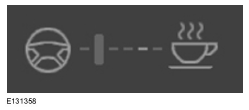
The alert level is low: no break is required.
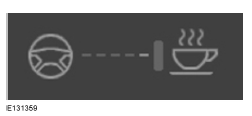
The alert level is high: you must take a break as soon as possible, for safety reasons.
The status bar moves from left to right as the calculated alert level increases. As the bar gets closer to the break icon, the colour changes from green to yellow and then to red, indicating that a break must be taken.
- Green: no break is required.
- Yellow: first alert (temporary).
- Red: second alert.
Your alert level is shown in grey when:
- the camera sensor is unable to track lane markings;
- vehicle speed drops below approximately 65 km/h.
System Reset
You can reset the system by:
- switching the ignition off and back on;
- stopping the vehicle, then opening and closing the driver's door.
Test yourself
A quick Ford Mondeo quiz: every answer comes with an explanation and a link to the manual page.