Using the system
Switching the system on and off
Note: The settings and system status remain unchanged during ignition cycles.
The system can be activated and deactivated using the information display. See General information (page 89).
Setting the system speed warning
The system offers a series of speed warning levels that can be set using the information display.
See General information
System display
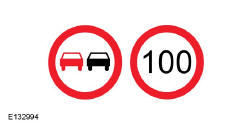
The system may display two traffic signs side by side.
You can check its status at any time using the multifunction display.
The system display works in four stages, as follows:
- All newly recognised road signs appear more prominently than other signs on the display.
- After a predetermined time, they are displayed normally.
- After a predetermined distance, they are displayed greyed out.
- After another predetermined distance, they are cleared.
If the system detects an additional sign, it is shown as a box below the respective sign, for example, when the vehicle passes a speed limit reduction sign on a wet road.
If your vehicle is equipped with a navigation system, stored road sign data may influence the speed limit value shown.
Test yourself
A quick Ford Mondeo quiz: every answer comes with an explanation and a link to the manual page.