Information Display Warning and Information Messages
| Indicator | Name | On/Blinking | Explanation | Message* |
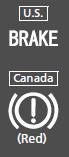 |
Parking Brake and Brake System Indicator (Red) |
|
|
 *1, then goes off if the parking brake has been released.
Avoid using the parking brake and have your vehicle checked by a dealer immediately.
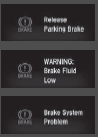
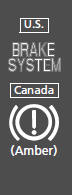
- Comes on for a few seconds when you turn the ignition switch to ON
 *1, then goes off.
- Comes on if there is a problem with a system related to braking other than the conventional brake system.
- Comes on if there is a problem with the electric parking brake system or the automatic brake hold system.
- Stays on constantly - Have your vehicle checked by a dealer.
- Comes on while driving - Avoid using the parking brake and have your vehicle checked by a dealer immediately.


- Comes on for a few seconds when you turn the ignition switch to ON
 *1, then goes off.
- Comes on when the automatic brake hold system is on.
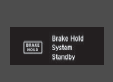

- Comes on for a few seconds when you turn the ignition switch to ON
 *1, then goes off.
- Comes on when the automatic brake hold is activated.


- Comes on when you turn the ignition switch to ON
 *1, and goes off when the engine starts.
- Comes on when the engine oil pressure is low.
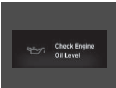

- Comes on when you turn the ignition switch to ON
 *1, and goes off when the engine starts, or after several seconds if the engine did not start. If ’readiness codes’ have not been set, it blinks five times before it goes off.
- Comes on if there is a problem with the emissions control system.
- Blinks when a misfire in the engine’s cylinders is detected.
- Readiness codes are part of the on board diagnostics for the emissions control systems.
- Comes on while driving - Have your vehicle checked by a dealer.
- Blinks while driving - Stop in a safe place where there are no flammable objects. Stop the engine for 10 minutes or more, and wait for it to cool down.


- Comes on when you turn the ignition switch to ON
 *1, and goes off when the engine starts.
- Comes on when the battery is not charging.




- Comes on for a few seconds when you turn the ignition switch to ON
 *1, then goes off.
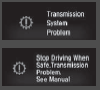
- Blinks if the transmission system has a problem.

- Comes on and the beeper sounds if you are not wearing a seat belt when you turn the ignition switch to ON
 *1.
- If the front passenger is not wearing a seat belt, the indicator comes on a few seconds later.
- Blinks while driving if either you or the front passenger has not fastened a seat belt. The beeper sounds and the indicator blinks at regular intervals.
- The beeper stops and the indicator goes off when you and the front passenger fasten their seat belts.
- Stays on after you or the front passenger has fastened the seat belt - A detection error may have occurred in the sensor. Have your vehicle checked by a dealer.


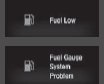
- Comes on when the fuel reserve is running low (approximately 1.8 U.S. gal/7.0 Liter left).
- Blinks if there is a problem with the fuel gauge.
- Comes on - Refuel your vehicle as soon as possible.
- Blinks - Have your vehicle checked by a dealer.

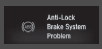
- Comes on for a few seconds when you turn the ignition switch to ON
 *1, then goes off.
- If it comes on at any other time, there is a problem with the ABS.

 *1, then goes off.
Comes on if a problem with any of the following is detected:
- Supplemental restraint system
- Side airbag system
- Side curtain airbag system
- Seat belt tensioner


- Comes on for a few seconds when you turn the ignition switch to ON (w*1, then goes off.
- Blinks when VSA’ is active.
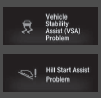
- Comes on if there is a problem with the VSA’ system or hill start assist system.


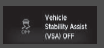
- Comes on for a few seconds when you turn the ignition switch to ON (w*1, then goes off.
- Comes on when you partially disable VSA’.


- Comes on for a few seconds if you turn the ignition switch to ON
 *1, then goes off.
- Comes on if any door or the trunk is not completely closed.
- The beeper sounds and the indicator comes on if any door or the trunk is opened while driving.


- Comes on when you turn the ignition switch to ON
 *1, and goes off when the engine starts.
- Comes on if there is a problem with the EPS system.
If the Electric Power Steering (EPS) System Indicator Comes


 *1.
May come on briefly if the ignition switch is turned to ON  *1 and the vehicle is not moved within 45 seconds, to indicate the calibration process is not yet complete.
Comes on and stays on when:
- One or more tires’ pressures are determined to be significantly low.
- The system has not been calibrated.
- Comes on while driving - Stop in a safe place, check tire pressures, and inflate the tire(s) if necessary.
- Stays on after the tires are inflated to the recommended pressures - The system needs to be calibrated.




- Comes on for a few seconds when you turn the ignition switch to ON
 *1, then goes off.
- Comes on along with a beep when a problem is detected. A system message on the driver information interface appears at the same time.
- While the indicator is on, press the
 (display/information) button to see the message again.
- Refer to the Indicators information in this chapter when a system message appears on the driver information interface. Take the appropriate action for the message.
- The driver information interface does not return to the normal screen unless the warning is canceled, or the button
 is pressed.


- Blink when you operate the turn signal lever.
- Blink along with all turn signals when you press the hazard warning button.


Repeatedly blinks - The system may be malfunctioning. Have your vehicle checked by a dealer.
Do not attempt to alter this system or add other devices to it. Electrical problems can occur.


- Comes on for a few seconds when you turn the ignition switch to ON
 *1, then goes off.
- Comes on when the scheduled maintenance is due soon.

Electric Parking Brake System
Blinks when the electric parking brake switch is pressed without depressing the brake pedal while the electric parking brake is in operation.

- Blinks when the automatic brake hold button is pressed without depressing the brake pedal while the automatic brake hold is in operation.
- Blinks if the automatic brake hold is automatically canceled while it is in operation. The beeper sounds.
- Blinks while driving - Press the automatic brake hold button with the brake pedal depressed.
- Immediately depress the brake pedal.


- Comes on for a few seconds when you turn the ignition switch to ON
 *1, then goes off.
- Comes on if there is a problem with the RDM system.

Use the climate control system to cool down the camera.
The system activates when the temperature inside the camera cools down.
- Stays on - The area around the camera is blocked by dirt, mud, etc. Stop your vehicle in a safe place, and wipe it off with a soft cloth.
- Have your vehicle checked by a dealer if the indicator and message come back on after you cleaned the area around the camera.


- Comes on for a few seconds when you turn the ignition switch to ON
 *1, then goes off.
- Comes on if there is a problem with ACC with LSF.

- Comes on if anything covers the radar sensor cover and prevents the sensor from detecting a vehicle in front.
- May come on when driving in bad weather (rain, snow, fog, etc.)
- ACC with LSF has been automatically canceled.
- When the radar sensor gets dirty, stop your vehicle in a safe place, and wipe off dirt using a soft cloth.
- Have your vehicle checked by a dealer if the indicator does not go off even after you clean the sensor cover.


- Use the climate control system to cool down the camera.
- Goes off - The camera has been cooled down. Pressing the MAIN button can resume the system.
Front Sensor Camera
Adaptive Cruise Control (ACC) with Low Speed Follow (LSF)*


- Comes on for a few seconds when you turn the ignition switch to ON
 *1, then goes off.
- Comes on if there is a problem with the LKAS.


- Use the climate control system to cool down the camera.
- Goes off - The camera has cooled down and the system is working normally.

- Comes on when the area around the camera is blocked by dirt, mud, etc. Stop your vehicle in a safe place, and wipe it off with a soft cloth.
- May come on when driving in bad weather (rain, snow, fog, etc.)


- Comes on for a few seconds when you turn the ignition switch to ON
 *1, then goes off.
- Comes on when you deactivate the CMBSTM. A driver information interface message appears for five seconds.
- Comes on if there is a problem with the CMBSTM.
Collision Mitigation Braking SystemTM (CMBSTM)*




- When the radar sensor gets dirty, stop your vehicle in a safe place, and wipe off dirt using a soft cloth.
- Have your vehicle checked by a dealer if the indicator does not go off even after you clean the sensor cover.


Information Display Warning and Information Messages*
The following messages appear only on the information display.
| Message | Condition | Explanation |
 |
Appears when there is a problem with the sensor on the battery. | Stays on constantly - Have your vehicle checked by a dealer. |
Test yourself
A quick Honda Civic quiz: every answer comes with an explanation and a link to the manual page.